What is Passive HDMI Cable? Simple & Easy Guide
Published: 9 Dec 2025
Have you ever wondered how your TV, monitor, or gaming console gets such clear video and sound? It’s all thanks to HDMI cables, which help send high-quality signals between devices.
While there are different types of HDMI cables, Passive HDMI Cables are the most common and simple to use. In this article, we will explore what passive HDMI cables are, how they work, their advantages, and when to use them.
What is Passive HDMI Cable?
A Passive HDMI Cable is a standard cable that transmits video and audio signals without needing extra power. It simply carries the signal from one device to another, from a laptop to a TV or a gaming console to a monitor.
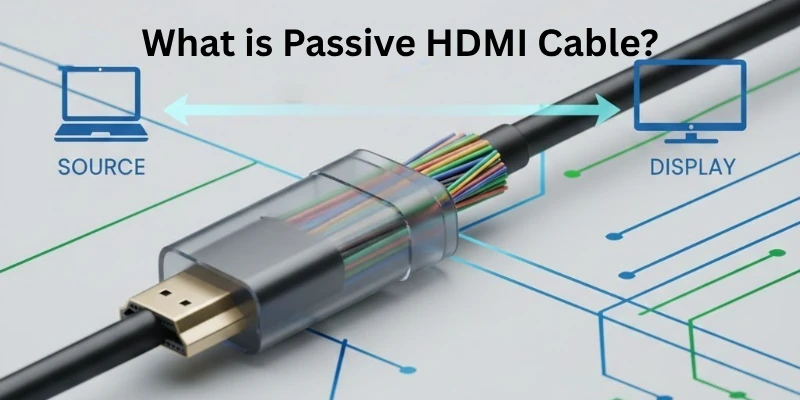
Unlike Active HDMI Cables, passive ones do not have built-in signal boosters, so they work best for short distances (usually under 15 feet). The signal may weaken if the cable is too long, leading to lower quality. Passive HDMI cables are affordable, easy to use, and perfect for everyday connections.
How Does Passive HDMI Cable Work?
A Passive HDMI Cable directly transfers video and audio signals from one device to another without any built-in signal booster or external power. It relies completely on the HDMI ports of connected devices to send the signal.
Step-by-Step Working:
- Signal Transmission: The cable carries digital signals from a source device (like a laptop, gaming console, or Blu-ray player) to a display (such as a TV or monitor).
- No Extra Power Needed: Unlike active HDMI cables, passive ones do not require additional power. They simply use the power from the HDMI ports.
- Short-Distance Performance: Passive cables work best for short connections (under 15 feet) because longer cables may cause signal loss.
- Audio & Video Synchronization: The cable ensures that both sound and picture travel together without delays.
- Plug-and-Play Simplicity: Just plug it into both devices, and it automatically works without needing any setup.
Because of their simple design, Passive HDMI Cables are great for everyday use.
Advantages & Disadvantages of Passive HDMI Cables
Here are some of the major pros and cons of passive HDMI cables:
Pros of Passive HDMI Cables:
- No extra power needed – Works directly through HDMI ports.
- Easy to use – Just plug and play, no setup required.
- Affordable – Cheaper than active HDMI cables.
- Great for short distances – Ideal for connections under 15 feet.
- Supports high-quality signals – Works well for 4K, gaming, and streaming if the distance is short.
Cons of Passive HDMI Cables:
- Not ideal for long distances – Signal quality drops beyond 15 feet.
- No built-in booster – Cannot strengthen weak signals.
- May not work well with all devices – Some devices may need an active HDMI cable for better performance.
- Possible interference – Longer cables may face signal loss or distortion.
- Limited future-proofing – May not support advanced features over longer distances.
When Should You Use Passive HDMI Cable?
A Passive HDMI Cable is the best choice for many common situations. Here, we will examine when to use it and why it works well in these cases.
Best Situations to Use Passive HDMI Cable:
- For short-distance connections – Ideal for setups under 15 feet without signal loss.
- When no extra power source is available – Works directly through HDMI ports without needing external power.
- For home entertainment systems – Great for TVs, gaming consoles, Blu-ray players, and streaming devices.
- When using standard resolutions – Supports 1080p and 4K as long as the cable length is short.
- For budget-friendly setups – A cost-effective choice for reliable HDMI connections.
- For simple plug-and-play use – No special setup or additional hardware is required.
- For office and presentation setups – Perfect for connecting conference room projectors, monitors, and laptops.
How to Set Up and Use Passive HDMI Cable?
Just follow these steps:
Step 1: Check Your Devices
- Ensure both devices (TV, monitor, gaming console, etc.) have HDMI ports.
- Verify that the HDMI cable supports the required resolution and refresh rate.
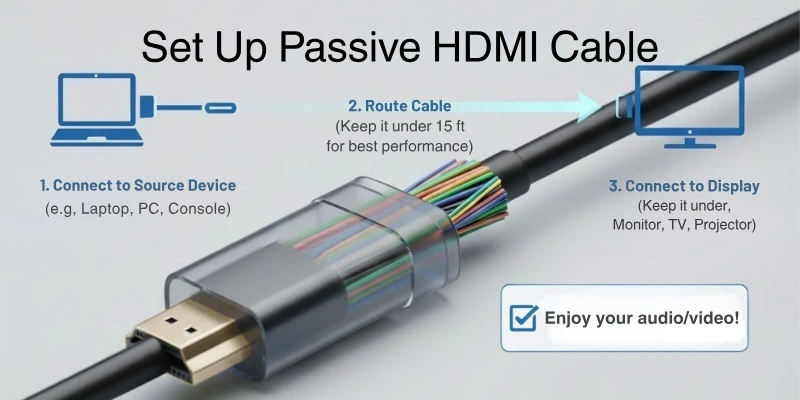
Step 2: Connect the HDMI Cable
- Plug one end of the HDMI cable into the source device (laptop, gaming console, Blu-ray player).
- Connect the other end to the display device (TV, monitor, projector).
Step 3: Select the HDMI Input
- Turn on both devices.
- Use the remote or display settings to select the correct HDMI input on your TV or monitor.
Step 4: Adjust Display & Audio Settings
- Go to the device settings and choose the correct resolution (1080p, 4K, etc.).
- Check the audio output settings to ensure sound is coming through the HDMI cable.
Step 5: Test the Connection
- Play a video or game to ensure smooth audio and video output.
- If there are issues, try using a different HDMI port or restarting the devices.
Best Passive HDMI Cables to Buy
Here are some generally recommended brands for passive HDMI cables that you can likely find on Amazon:
Reliable Brands for Passive HDMI Cables:
- Monoprice – A popular and reliable brand with affordable and high-quality HDMI cables. Their “Certified Premium High-Speed HDMI Cables” support 4K@60Hz and HDR.
- Cable Matters – Well-known for making strong and durable HDMI cables. They offer different lengths, including braided options for extra protection.
- Amazon Basics – A budget-friendly choice that works well for everyday use. Their “High-Speed HDMI Cables” are great for TVs, laptops, and gaming consoles.
- Belkin – A trusted brand with good-quality HDMI cables. They may cost a bit more, but they are durable and reliable.
- UGREEN – A fast-growing brand known for well-made and affordable cables. They offer different styles, including braided HDMI cables.
- Highwings – A popular brand on Amazon, offering newer HDMI standards and well-reviewed cables with great build quality.
Conclusion
This article explored Passive HDMI Cables, their features, advantages, and when to use them. If you need an affordable, easy-to-use cable for short-distance connections, a good-quality passive HDMI cable is a perfect choice.
My advice? Always check the HDMI version and cable length to ensure the best performance. Keep following my expert guides for everything about HDMI—enjoy seamless connections!
FAQs
Here are some of the most commonly asked questions related to passive HDMI cables:
Yes, a high-quality passive HDMI cable can support 4K resolution as long as the cable length is short (under 15-25 feet). For longer distances, signal quality may weaken. To ensure smooth performance, choose a certified high-speed HDMI cable.
Passive HDMI cables usually work well up to 15-25 feet (5-7.5 meters) without losing signal quality. Beyond this length, you may notice weaker signals or screen flickering. For longer distances, consider using an active HDMI cable or fiber optic HDMI cable.
No, passive HDMI cables do not require an external power source. They transmit signals directly from the source device to the display. This makes them easy to use and perfect for simple plug-and-play connections.
Yes, they are great for gaming consoles like PlayStation, Xbox, and PCs, as long as the cable is short and supports the required refresh rate (e.g., 60Hz, 120Hz). If you need a longer cable or higher refresh rates, an active HDMI cable might be a better option.
Look for trusted brands, check for certifications (like Premium High-Speed HDMI), and ensure it supports the latest HDMI version (2.0, 2.1, etc.). A braided or gold-plated cable often lasts longer and provides better durability.




- Be Respectful
- Stay Relevant
- Stay Positive
- True Feedback
- Encourage Discussion
- Avoid Spamming
- No Fake News
- Don't Copy-Paste
- No Personal Attacks
- Be Respectful
- Stay Relevant
- Stay Positive
- True Feedback
- Encourage Discussion
- Avoid Spamming
- No Fake News
- Don't Copy-Paste
- No Personal Attacks
