What Is HDMI Repeater? Complete Guide
Published: 12 Dec 2025
Are you struggling with weak HDMI signals over long distances? An HDMI Repeater is designed to enhance and restore signal strength, ensuring smooth audio and video transmission.
In this article, we’ll explain how HDMI Repeaters work, their key features, installation tips, and how they compare to other HDMI solutions. By the end, you’ll know exactly when and how to use an HDMI repeater for the best performance.
What Is HDMI Repeater?
An HDMI Repeater is a small device that helps strengthen an HDMI signal so it can travel a longer distance without losing quality. When an HDMI cable is too long, the signal can become weak, causing blurry video or no display at all.
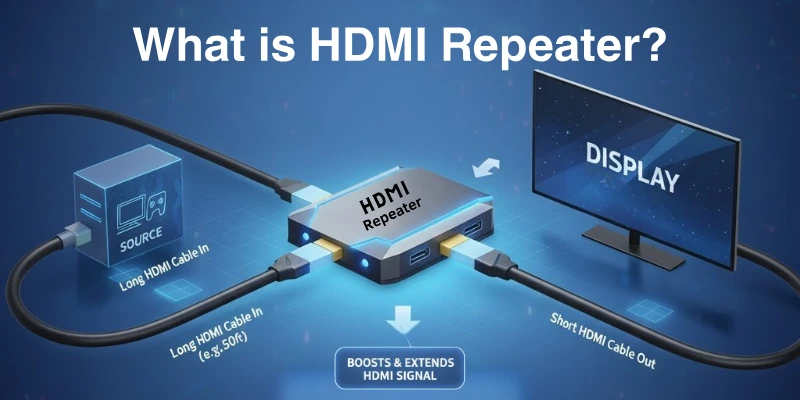
An HDMI Repeater takes that weak signal, boosts it, and sends it forward, ensuring clear picture and sound. It is useful for home theaters, gaming, and big-screen setups where long HDMI cables are needed.
How HDMI Repeaters Work?
In this section, we will look at how the HDMI repeaters work:
- Receives the HDMI Signal – The repeater takes input from an HDMI cable carrying a weak signal.
- Boosts and Regenerates – It amplifies and refreshes the signal to restore its strength.
- Sends the Enhanced Signal – The strengthened signal is transmitted through another HDMI cable to the next device (TV, projector, etc).
This process ensures smooth, high-quality video and audio, even with long HDMI cables.
Key Features of HDMI Repeater
Here are some of the significant features of HDMI repeaters:
- Signal Boosting – Enhances weak HDMI signals for longer cable runs.
- Supports High Resolutions – Works with 1080p, 4K, and even 8K displays.
- HDCP Compliance – Ensures compatibility with protected content (e.g., Netflix, Blu-ray).
- Plug-and-Play – Easy setup with no extra power source needed in most models.
- Low Latency – Minimal delay for gaming and high-speed video streaming.
- Compact Design – Small and lightweight for easy installation.
- Multiple HDMI Versions – Compatible with HDMI 1.4, HDMI 2.0, and HDMI 2.1 devices.
When to Use HDMI Repeater?
An HDMI Repeater is useful when an HDMI signal becomes weak over long distances.
- When using long HDMI cables (over 10-15 meters) to prevent signal degradation.
- For home theaters to connect projectors, TVs, or AV receivers far from the source.
- In gaming setups, to ensure low latency and high-quality visuals over long distances.
- For conference rooms, connect laptops or media players to large screens or projectors.
- Digital signage distributes content across multiple distant screens in malls, airports, or businesses.
- For live events, HDMI signals must travel across large venues or multiple display setups.
- In classrooms and auditoriums, a teacher or presenter must display content on a far-off screen.
- CCTV and security systems should extend HDMI signals from security cameras to monitoring stations.
- In multi-room setups, one HDMI source must be sent to different rooms without quality loss.
How to Install HDMI Repeater?
Installing an HDMI Repeater is simple and requires just a few steps to ensure a strong and clear signal.
- Check the Cable Length – Ensure your HDMI cable is long enough but not exceed the recommended limit (usually 10-15 meters before and after the repeater).
- Connect the Input Cable – Plug one end of the HDMI cable from the source (e.g., laptop, gaming console, or Blu-ray player) into the input port of the repeater.
- Connect the Output Cable – Plug another HDMI cable from the output port of the repeater to the display device (e.g., TV, projector, or monitor).
- Power the Repeater (if required) – Some repeaters are self-powered, but others need an external power adapter via USB or DC input.
- Test the Connection – Turn on your devices and check if the signal is clear and stable.
- Adjust if Needed – If you experience signal issues, try using shorter or higher-quality HDMI cables and ensure the repeater is compatible with your HDMI version (e.g., HDMI 2.0, 2.1).
HDMI Repeater vs. Other Signal Boosting Solutions
An HDMI Repeater is just one of several solutions for extending HDMI signals. Let’s compare it with other signal-boosting options.
| Solution | How It Works | Best For | Pros | Cons |
| HDMI Repeater | Boosts HDMI signal over long cables | Medium-range extensions (10-30m) | Simple, affordable, no extra power needed (in some models) | Limited range, may need extra power for very long distances |
| HDMI Extender (over Ethernet) | Converts HDMI signal to travel over Cat5e/Cat6 cables | Long-distance extensions (50-100m) | Works over long distances, cost-effective | Requires additional adapters and cables |
| HDMI Active Cable | Built-in booster in the HDMI cable itself | Direct long cable runs (up to 30m) | No extra device needed, plug-and-play | More expensive than a regular HDMI cable |
| HDMI Splitter with Booster | Splits and amplifies one HDMI signal to multiple outputs | Multi-screen setups | Sends the signal to multiple displays without loss | More expensive, may require power |
| HDMI Fiber Optic Cable | Uses fiber optics to transmit HDMI signal over very long distances | Ultra-long distances (100m+) | No signal loss, best for 4K/8K | Expensive, not widely available |
Which One to Choose?
- Use an HDMI Repeater if you need to extend an HDMI signal over medium distances (10-30m) without major setup changes.
- Choose an HDMI Extender (Ethernet) for distances over 50m.
- An active HDMI cable works well for long, direct connections without extra devices.
- An HDMI Splitter with a Booster is ideal for multi-screen setups.
- HDMI Fiber Optic Cables offer the best performance but at a high cost for ultra-long distances.
Choosing the Right HDMI Repeater
When selecting an HDMI Repeater, consider key factors to ensure compatibility and the best performance for your setup.
1. HDMI Version Compatibility
- Choose a repeater that supports your devices’ HDMI version (1.4, 2.0, or 2.1).
- For 4K at 60Hz or 8K, pick an HDMI 2.0 or 2.1 repeater.
2. Maximum Supported Resolution
- Ensure the repeater supports your display’s resolution, such as 1080p, 4K, or 8K.
- Higher resolutions need a repeater with more bandwidth.
3. Supported Distance
- Basic repeaters work for 10-30 meters.
- For longer distances, consider an active HDMI repeater or extender.
4. Power Requirements
- Some repeaters are self-powered via HDMI, while others need USB or DC power.
- Powered repeaters are better for longer cables and higher resolutions.
5. HDCP Compliance
- If streaming from Netflix, Amazon Prime, or using Blu-ray, ensure it supports HDCP 2.2 or higher.
6. Audio Support
- Check if it supports Dolby Atmos, DTS:X, and other audio formats for home theaters.
7. Build Quality & Brand Reputation
- Choose a reliable brand with good reviews and durable materials to avoid signal loss or failure.
Best for Different Uses:
- Gaming & Streaming: HDMI 2.0/2.1, low latency, 4K 60Hz support
- Home Theater: High-resolution support (4K/8K), Dolby Atmos compatibility
- Conference Rooms & Digital Displays: Long-distance capability, powered repeater
Troubleshooting Common HDMI Repeater Issues
Even with the right setup, HDMI Repeaters can sometimes have issues.
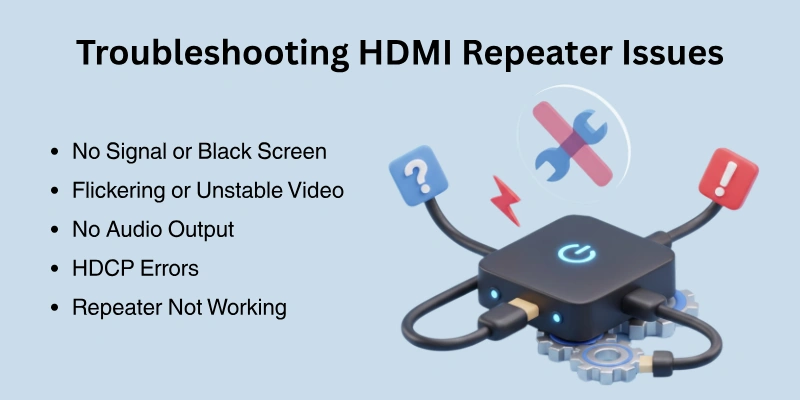
Here’s how to fix the most common problems:
1. No Signal or Black Screen
- Check cable connections – Ensure all HDMI cables are firmly plugged in.
- Verify HDMI version compatibility – The repeater should match the HDMI version of your devices.
- Try shorter HDMI cables – Long or low-quality cables can cause signal loss.
- Restart all devices – Power cycle the source, repeater, and display.
2. Flickering or Unstable Video
- Use high-quality HDMI cables – Cheap cables may not handle high resolutions.
- Ensure proper power supply – If the repeater requires power, use the correct adapter.
- Lower the resolution – If using 4K, try 1080p to see if the issue improves.
3. No Audio Output
- Check audio settings – Ensure audio output is set to HDMI on your source device.
- Confirm audio format support – Some repeaters don’t support Dolby Atmos or DTS:X.
- Try a different HDMI port – Some TVs or AV receivers process audio differently.
4. HDCP Errors (Protected Content Not Playing)
- Use an HDCP-compliant repeater – Ensure it supports HDCP 2.2 or higher for Netflix, Prime Video, etc.
- Check for compatibility issues – Some old HDMI devices don’t support HDCP 2.2.
5. Repeater Not Working at Long Distances
- Use a powered HDMI repeater – Longer cables need additional power.
- Upgrade to an HDMI Extender – For very long distances, an HDMI-over-Ethernet solution may work better.
Final Thoughts
In this guide, we covered everything you need to know about HDMI Repeaters, including what they are, why they are needed, how they work, key features, installation steps, and troubleshooting common issues.
An HDMI repeater is an excellent choice if you need to extend your HDMI signal over a medium distance (10-30m) while maintaining high-quality video and audio. However, for very long distances, consider an HDMI Extender or Fiber-Optic HDMI Cable.
Before buying, check for resolution support, HDCP compliance, and power requirements.
FAQs
Here are some of the most commonly asked questions related to HDMI repeaters:
Yes, you can use more than one, but too many can weaken the signal. The video or sound might not work properly if the total cable length is too long. If you need to extend the signal even further, an HDMI Extender is a better choice.
No, an HDMI Repeater does not make the quality better. It only keeps the original quality when sending the signal over a long distance. If the signal is already bad, a repeater will not fix it.
It depends on the HDMI version and quality of the cables. Most HDMI Repeaters work up to 100 feet (30 meters) for 1080p and 50 feet (15 meters) for 4K. If you need to go further, an HDMI Extender is a better option.
Make sure the repeater is placed between two cables, not at the end. Also, check if it supports your HDMI version and HDCP (copy protection). A weak power source or damaged cables can also cause problems.
Some low-quality HDMI Repeaters may cause a small delay, which can be a problem for gaming. To avoid this, use a high-quality HDMI 2.0 or 2.1 repeater that supports low-latency and fast signal transfer.
An HDMI Repeater extends the signal over a long distance to one display. An HDMI Splitter copies one HDMI signal and sends it to multiple screens at the same time. Some splitters also have a built-in repeater.



- Be Respectful
- Stay Relevant
- Stay Positive
- True Feedback
- Encourage Discussion
- Avoid Spamming
- No Fake News
- Don't Copy-Paste
- No Personal Attacks
- Be Respectful
- Stay Relevant
- Stay Positive
- True Feedback
- Encourage Discussion
- Avoid Spamming
- No Fake News
- Don't Copy-Paste
- No Personal Attacks
