HDMI or SDI: Which Cable Works Best for You?
Published: 1 Oct 2025
When working with video and audio systems, two common connection types often come up — HDMI vs SDI. Both are used to transmit audio and video signals, but they serve different purposes and environments.
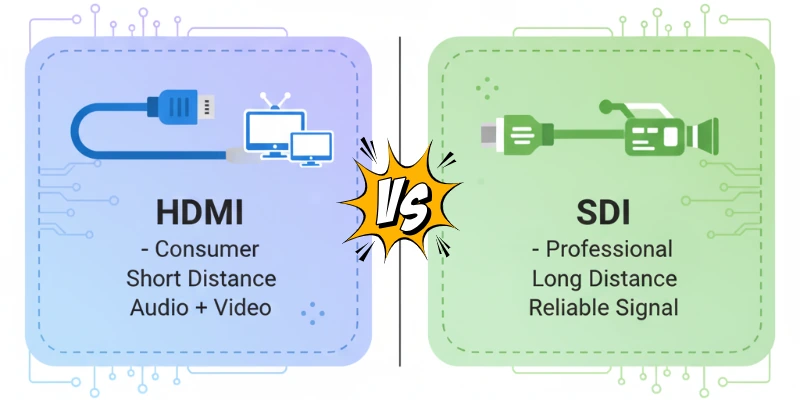
HDMI is widely used in homes for TVs, computers, and gaming consoles. On the other hand, SDI is mainly used in professional video production, broadcasting, and live event setups.
So, what’s the difference between them? Why would someone choose SDI over HDMI or vice versa?
In this article, we’ll break down the key differences between HDMI and SDI, helping you understand which one is better for your needs.
Note: We’ve already covered HDMI in detail in [this article – link here]. So, we’ll keep the HDMI section brief and focus more on the comparison.
What is HDMI? (Quick Overview)
HDMI stands for High-Definition Multimedia Interface. It is a commonly used cable and connector type for transmitting both video and audio signals from one device to another.
You’ll find HDMI ports on TVs, laptops, monitors, gaming consoles, projectors, and many other consumer electronics.
Key Features of HDMI:
- Transmits both audio and video through a single cable
- Supports HD, Full HD, 4K, and even 8K resolutions
- Commonly used in home theaters and office setups
- Easy plug-and-play setup
- Comes in various types (Standard HDMI, Mini HDMI, Micro HDMI)
For a detailed guide on HDMI, its types, uses, pros, and limitations, check our full article here: [Internal Link to HDMI Article]
What is SDI?
SDI stands for Serial Digital Interface. It is a professional video transmission standard used mainly in broadcasting, television production, live events, and video studios.
Unlike HDMI, SDI is designed for long-distance signal transmission without loss of quality. It uses coaxial cables with BNC connectors, which are more secure and durable than HDMI connectors.
Key Features of SDI:
- Transmits uncompressed digital video and audio
- Designed for professional environments
- Offers strong signal integrity over long cable runs
- Uses locking BNC connectors to avoid accidental disconnection
- Ideal for multi-camera setups and live production workflows
Types of SDI (Based on Bandwidth and Resolution):
Here is the list of SDI types:
| Type | Resolution Support | Maximum Cable Length |
| SD-SDI | Standard Definition (480i/576i) | ~300 meters |
| HD-SDI | High Definition (720p/1080i) | ~100 meters |
| 3G-SDI | Full HD (1080p at 60fps) | ~100 meters |
| 6G-SDI | Up to 4K at 30fps | ~70 meters |
| 12G-SDI | Up to 4K at 60fps | ~40-50 meters |
Each generation supports higher resolution and faster data transmission speeds.
Where SDI is Commonly Used:
- TV studios and broadcasting stations
- Professional live streaming setups
- Video switchers and capture devices
- Event production and film shoots
SDI is preferred by professionals because it offers more reliable performance, durable connectors, and better signal quality over long distances compared to HDMI.
HDMI vs SDI: Side-by-Side Comparison
When comparing HDMI and SDI, the main differences come down to their purpose, build quality, signal strength, and usability. So here is a clear overview of each.
1. Purpose and Usage
HDMI is made for consumer devices like TVs, laptops, monitors, and gaming consoles. SDI, on the other hand, is mainly used in professional video setups like broadcast studios, video switchers, and live event productions.
2. Connector Type
HDMI connectors are flat and can be unplugged easily, especially if the cable is moved or shaken. SDI uses BNC connectors that lock securely, preventing accidental disconnection — ideal for professional setups.
3. Cable Length Support
HDMI cables work best over short distances (up to 15–20 meters). Beyond that, signal degradation can occur. SDI cables can run much longer — up to 100 meters or more — without losing quality, depending on the SDI version.
4. Signal Strength and Quality
HDMI signals often weaken over longer distances, which can lead to video dropouts or quality loss. SDI maintains consistent and strong signal quality, even over extended cable runs.
5. Durability
SDI cables and connectors are built for rough, professional use — they’re more rugged and durable. HDMI cables are more fragile and not ideal for harsh or high-movement environments.
6. Audio & Video Transmission
Both HDMI and SDI transmit audio and video, but HDMI supports additional consumer features like CEC control and ARC (Audio Return Channel) which SDI does not offer.
7. Encryption Support
HDMI supports HDCP (High-bandwidth Digital Content Protection) — this prevents unauthorized copying of content. SDI usually does not include encryption; it transmits a raw, unencrypted signal.
8. Cost
HDMI equipment and cables are more affordable and widely available, while SDI components are generally more expensive, due to their professional-grade design and performance.
9. Ease of Setup
HDMI is simple to use — just plug and play. SDI requires a bit more technical knowledge and is usually handled by professionals in video production environments.
HDMI or SDI – Comparison Table
Here is a quick overview of both SDI and HDMI:
| Feature | HDMI | SDI |
| Purpose & Usage | Home, consumer electronics | Professional, broadcast & production |
| Connector Type | Flat, non-locking | BNC, secure locking |
| Cable Length Support | Short (up to 15–20 meters) | Long (up to 100+ meters depending on type) |
| Signal Quality | Can degrade over distance | Strong over long distances |
| Durability | Less durable, fragile | Highly durable, rugged |
| Audio & Video Support | Yes | Yes |
| Encryption Support | Supports HDCP | Usually no encryption |
| Cost | Budget-friendly | More expensive |
| Ease of Setup | Plug-and-play | Needs technical setup |
Which One Should You Use – HDMI or SDI?
Choosing between HDMI and SDI depends entirely on your specific needs and environment.
- If you’re setting up a home theatre, gaming console, laptop-to-TV connection, or casual video viewing, then HDMI is the best choice. It’s affordable, easy to use, and perfect for short-distance connections.
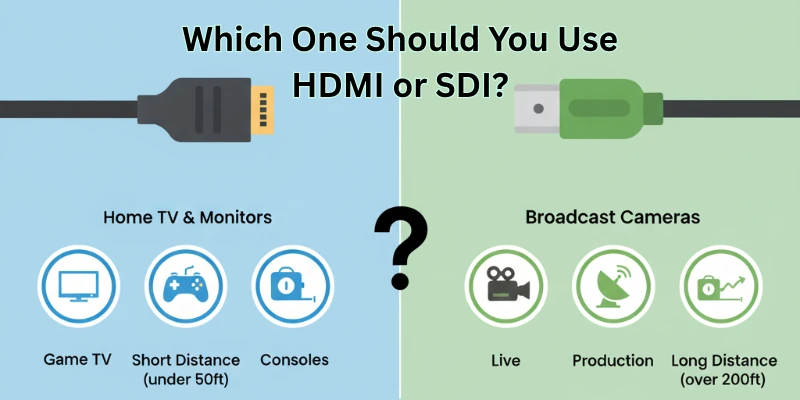
- But if you’re working in a professional environment like live video production, multi-camera setups, broadcast studios, or large-scale events, then SDI is ideal. It’s reliable, supports long-distance transmission, and ensures better connection stability.
Key Factors to Consider:
- Budget: HDMI is cheaper; SDI is costlier.
- Distance: HDMI works for short distances; SDI handles long cable runs.
- Use-Case: HDMI fits consumer use; SDI fits professional production.
- Environment: HDMI is for indoor/static setups; SDI is for dynamic/pro-level workflows.
Can You Convert Between HDMI and SDI?
Yes, you can convert between HDMI and SDI using special devices called signal converters. These are helpful when you need to connect HDMI-based equipment to SDI systems or vice versa.
Types of Converters:
List of common ones:
- HDMI to SDI Converters: These devices take an HDMI signal from a consumer device (like a laptop or camera) and convert it into an SDI output so it can be used in a professional video setup.
- SDI to HDMI Converters: These converters allow SDI signals from professional cameras or switchers to be viewed on HDMI displays like TVs, monitors, or projectors.
Cost of Converters:
Points to be noted:
- Basic Converters: Usually range from $30 to $80 USD.
- Advanced Converters: With additional features (like audio embedding or 4K support), can cost $100+ USD.
- Many brands like Blackmagic Design, Atomos, and Decimator Design offer reliable converter options.
How Do These Converters Work?
These are plug-and-play devices. You connect the input source (HDMI or SDI), and the converter outputs the desired signal format. Most converters require a power source and may include signal amplifiers for better performance.
Final Thoughts
Let’s quickly recap the key differences and help you decide which one suits your needs best.
Quick Summary of Key Differences:
- HDMI is perfect for home, casual, and consumer use.
- SDI is designed for professional, broadcast, and production-level setups.
- HDMI supports HDCP encryption, while SDI does not.
- SDI handles longer cable distances without signal loss.
- HDMI is budget-friendly, SDI is more rugged and reliable.
Which One Should You Choose?
- Choose HDMI: If you’re setting up a TV, gaming console, or computer screen — especially for home or office use.
- Choose SDI: If you’re in video production, handling multiple cameras, or need stable signals over long distances in demanding environments.
Still confused? Read our full guide on HDMI: What It Is and How It Works.
FAQs
Here are some of the most commonly asked questions related to HDMI vs. SDI quality:
HDMI is a consumer-friendly video/audio interface mostly used for TVs and monitors, while SDI is a professional video standard used in broadcasting and production setups. SDI supports longer cable runs and offers better signal stability.
Yes, you can — but only in simple setups where distance is short and there’s no need for professional equipment. For complex or long-distance needs, SDI is better.
SDI is built for long-distance video transmission, provides a locking connector, and delivers higher signal integrity. That’s why it’s preferred in professional video environments.
No, not at all. SDI is still widely used in broadcast studios, live event production, and multi-camera setups. It’s a reliable standard even today.
It depends on your use case. HDMI is better for home entertainment and consumer devices due to its affordability and ease of use. SDI, on the other hand, is better for professional video production, live events, and broadcast setups.
An HDMI to SDI splitter is a device that takes one HDMI input and splits it into multiple SDI outputs. It’s useful when you need to send the same HDMI signal to multiple SDI monitors, recorders, or switchers in a production environment.
Generally, no. Most HDMI to SDI converters require power because they need to actively convert the digital HDMI signal to a different format (SDI). Passive converters typically do not work for HDMI to SDI conversion due to the signal processing involved. You’ll usually need a powered (active) converter for stable results.

- Be Respectful
- Stay Relevant
- Stay Positive
- True Feedback
- Encourage Discussion
- Avoid Spamming
- No Fake News
- Don't Copy-Paste
- No Personal Attacks
- Be Respectful
- Stay Relevant
- Stay Positive
- True Feedback
- Encourage Discussion
- Avoid Spamming
- No Fake News
- Don't Copy-Paste
- No Personal Attacks
