Difference between HDMI ARC & HDMI eARC
Published: 23 Sep 2025
When connecting your TV to a soundbar or home theater system, HDMI ARC and HDMI eARC are two common terms you’ll come across. Both allow audio to pass from your TV to external speakers using an HDMI cable. But what’s the real difference between ARC and eARC?
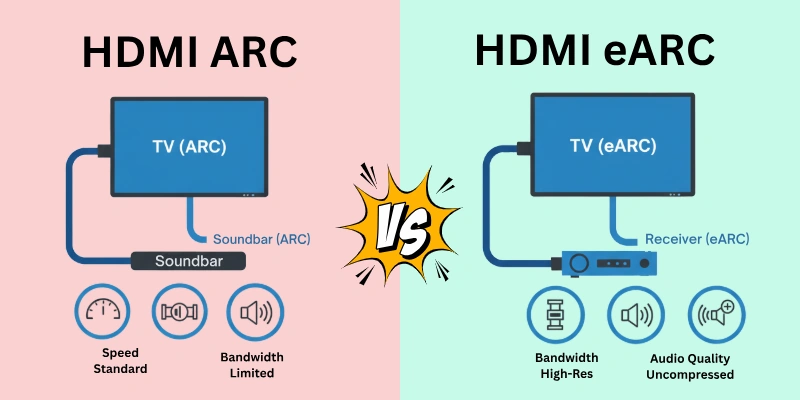
In this article, we’ll focus only on the detailed differences between HDMI ARC and HDMI eARC. If you’re new to these terms, first check our guides:
Lets dig in!
HDMI ARC vs eARC: Comparison
So, everyone here, we will cover what is the difference between HDMI ARC vs. eARC in great detail. Here I have listed all the possible comparisons that can differentiate both HDMI key terms:
- Audio Quality
- Audio Formats Supported
- Bandwidth
- Cable Compatibility
- Lip Sync Correction
- Device Compatibility
- Ease of Setup
- Control Features (CEC)
- Backward Compatibility
- Channel Support
- Cost
- Future-Proofing
Let’s look at all possible and unique differences between eARC and ARC one by one.
1. Audio Quality
Audio quality means how clear and rich the sound is. Good audio quality gives you sharp, clean, and detailed sound — just like hearing a live performance or being inside a cinema.
Better audio quality means:
- Clearer sound
- Deeper bass
- Louder and more balanced audio
- No unwanted noise or distortion
Now, let’s see how HDMI ARC and HDMI eARC affect audio quality.
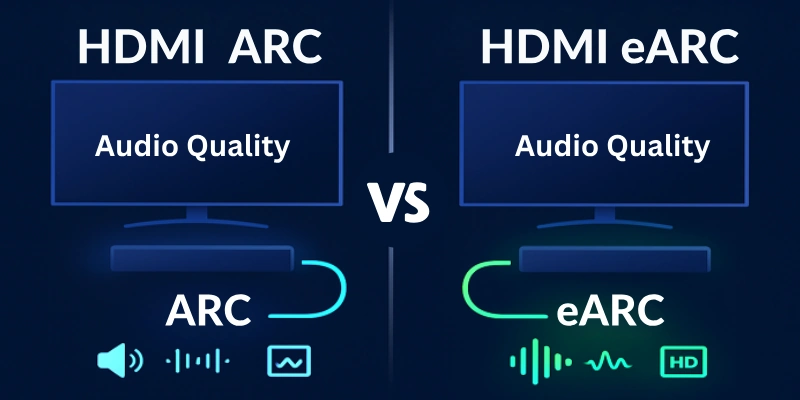
Audio Quality in HDMI ARC
HDMI ARC gives basic sound quality.
- It only supports compressed sound formats like Dolby Digital or DTS.
- These formats are fine for regular TV watching or simple soundbars.
- But some audio details may be lost because compression reduces sound quality.
Audio Quality in HDMI eARC
HDMI eARC gives high-quality, uncompressed sound.
- It supports advanced sound formats like Dolby TrueHD, DTS-HD Master Audio, and Dolby Atmos.
- These formats keep the full sound details without cutting or compressing them.
- It feels like surround sound in a movie theater — more powerful and realistic.
The Main Difference
- ARC compresses sound, so you lose some sound details.
- eARC keeps the full original sound, so it is richer, clearer, and more powerful.
- If you want the best sound experience, eARC is the better choice.
2. Audio Formats Supported
In the previous section, we talked about how audio quality changes with ARC and eARC. Now let’s understand which sound formats each one can handle.
Think of audio formats like different flavors of sound. Some are basic and simple, while others are rich and detailed.
Audio Formats in HDMI ARC
HDMI ARC works with standard audio formats — the common ones that most TVs and speakers understand.
These include:
- PCM (2.0) – Very basic left and right channel sound
- Dolby Digital (5.1) – Surround sound, but compressed
- DTS (5.1) – Another type of surround sound, also compressed
These formats are okay for normal TV use, like watching news, YouTube, or regular movies. But the sound is not the best, especially for home theater systems.
Audio Formats in HDMI eARC
HDMI eARC is made for high-end sound systems. It supports both basic and advanced audio formats, including uncompressed formats.
These include:
- PCM (5.1 and 7.1) – Clear multi-channel audio
- Dolby TrueHD – Very rich, studio-quality sound
- DTS-HD Master Audio – Powerful, high-definition sound
- Dolby Atmos – Sound that moves around you, even above your head
- DTS:X – 3D-style sound that surrounds you from every angle
These formats are used in modern movies, Blu-ray players, and soundbars. You get a more lifelike, cinematic sound.
The Main Difference
- ARC is limited to basic formats, mostly compressed.
- eARC can handle advanced formats, without compression.
- So, if your speaker supports Dolby Atmos or DTS:X, you need eARC to enjoy them fully.
3. Bandwidth
Now let’s talk about another important difference between HDMI ARC and HDMI eARC — the bandwidth. Bandwidth means how much data (like sound signals) can travel through a cable in one second.
Simply:
- Low bandwidth = less audio data = limited sound quality
- High bandwidth = more audio data = better sound quality
Bandwidth of HDMI ARC
HDMI ARC has low bandwidth.
- It can only carry small-sized audio data.
- That’s why it only supports basic or compressed audio formats like Dolby Digital and DTS.
- It can’t handle heavy audio signals like Dolby Atmos or DTS:X properly.
Result: You may miss out on advanced sound features.
Bandwidth of HDMI eARC
HDMI eARC has much higher bandwidth.
- It can carry a large amount of audio data without cutting or compressing it.
- That’s why it supports uncompressed formats like Dolby TrueHD, DTS-HD Master Audio, and 3D sound formats like Dolby Atmos.
- The sound reaches your speaker in full quality, just as it was sent from the TV or device.
Result: You get a rich, detailed, and theater-like sound.
The Major Difference
- ARC has low bandwidth, so it can’t handle advanced sound formats.
- eARC has high bandwidth, so it can deliver full-quality, heavy audio formats without losing any details.
If you want high-quality audio performance, eARC is the better option — all because of its larger bandwidth.
4. Cable Compatibility
Cable compatibility means whether your current HDMI cable works properly with ARC or eARC. Not all cables support the same features, especially when it comes to high-speed audio transfer.
So, you need to know if your existing HDMI cable is enough, or you need a better one to use eARC features.
Cables Used with HDMI ARC
ARC works with almost any standard HDMI cable type.
- Even older HDMI cables (version 1.4 or above) can support ARC.
- So if your system uses ARC, you don’t need to buy a special cable.
Result: Easy and low-cost setup.
Cables Needed for HDMI eARC
eARC needs a better cable to perform at its best. While some high-speed HDMI cables may still work, the best option is a:
- “High-Speed HDMI Cable with Ethernet” or
- “Ultra High-Speed HDMI Cable” (recommended for full eARC features).
These cables support higher bandwidth and better audio data transfer.
Result: You might need to upgrade your cable to enjoy all the advanced sound formats with eARC.
The Major Difference
- ARC works fine with old HDMI cables.
- eARC may require a newer and faster HDMI cable for full support.
- So if you switch to eARC, don’t forget to check your cable type — or you won’t get the full audio experience.
5. Lip Sync Correction
Lip sync means the audio and video should play together at the same time. For example, when a person talks on screen, you should hear their voice at the exact moment their lips move.
But sometimes, audio reaches your speakers a bit late, while the video is already on screen — this is called lip sync delay.
Lip sync correction is a feature that helps to fix this delay automatically.
Lip Sync Support in HDMI ARC
HDMI ARC does not have automatic lip sync correction.
- If your sound and video get out of sync, you need to fix it manually from your TV or speaker settings (if available).
- Not all devices support this manual correction properly.
Result: You might face sync issues, especially in fast-action scenes or with surround sound setups.
Lip Sync Support in HDMI eARC
HDMI eARC comes with built-in automatic lip sync correction.
- It means your system can automatically match the sound with the video — no need to adjust settings manually.
- Works better with modern TVs and sound systems.
Result: You get smoother, delay-free sound that matches the video perfectly.
The Major Difference
- ARC may cause lip sync problems, and you need to adjust things manually.
- eARC solves lip sync problems automatically, so you get a better viewing experience.
If you want perfect audio-video match without hassle, eARC is the winner here.
6. Device Compatibility
Device compatibility means how well HDMI ARC or eARC works with your TV, soundbar, home theater, or other audio/video devices. It also shows whether your existing setup can support the feature properly or not.
Device Compatibility with HDMI ARC
HDMI ARC is supported by almost all modern TVs, soundbars, and AV receivers.
- It has been available since HDMI version 1.4, so even older devices may have an ARC port.
- You don’t need a very advanced setup to use ARC — it’s quite universal and simple.
Result: ARC works easily with most standard audio systems.
Device Compatibility with HDMI eARC
HDMI eARC is a newer feature, available from HDMI version 2.1.
- So, only new TVs and audio systems that support HDMI 2.1 can use full eARC features.
- Some devices may have partial eARC support, but not all features will work unless both your TV and sound system are eARC-compatible.
Result: To use eARC, you may need to upgrade your devices.
The Major Difference
- ARC works with many old and new devices — it’s widely available.
- eARC only works with newer, HDMI 2.1-supported devices — limited to modern setups.
- So if you’re using older equipment, ARC might be your only option. But if you have a new system or plan to upgrade, eARC gives better performance.
7. Ease of Setup
Ease of setup means how simple or complicated it is to connect and use HDMI ARC or eARC with your TV, soundbar, or home theater system.
Setup with HDMI ARC
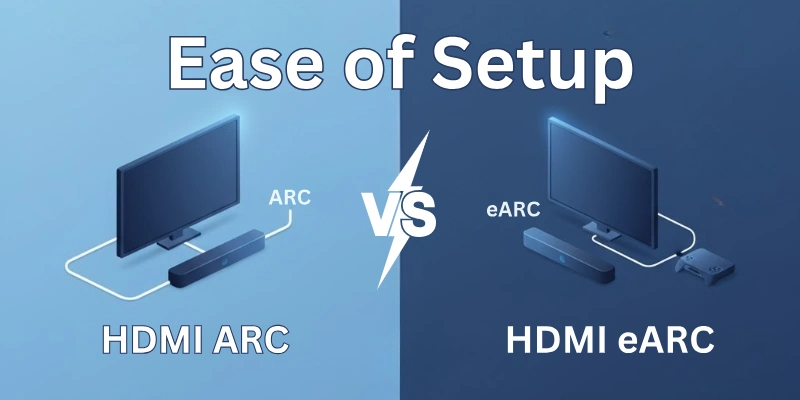
ARC is easy to set up.
- You just need a single HDMI cable between TV and sound system.
- Most TVs detect the ARC connection automatically.
- Even if manual settings are needed, they are usually simple and quick.
Result: ARC is beginner-friendly and works smoothly with most setups.
Setup with HDMI eARC
eARC setup is also simple, but sometimes needs:
- A newer cable (Ultra High-Speed HDMI)
- Compatible devices on both ends
Once connected, it works automatically and even offers better sound without extra settings.
Result: Setup is easy — just check your cable and device support first.
The Major Difference
- Both are easy to set up, but ARC works with more devices and older cables, while eARC may need updated equipment and cables.
- Once setup is done, eARC gives better sound performance with the same ease.
8. Control Features (CEC)
HDMI-CEC stands for Consumer Electronics Control. It lets you control multiple devices using one remote. For example:
- You can use your TV remote to control the soundbar volume.
- Turning off the TV also turns off the sound system.
HDMI ARC and CEC
ARC works together with HDMI-CEC.
- You can control basic sound functions (volume, power) using your TV remote.
- However, it may not always be smooth — depends on the brand and device support.
Result: Simple remote control options, but not always perfect.
HDMI eARC and CEC
eARC also works with HDMI-CEC.
- In many setups, eARC and CEC work better together, giving more stable control.
- Still, CEC performance depends on the devices, not just ARC or eARC.
Result: eARC supports better and smoother device control in most cases.
The Major Difference
- Both support HDMI-CEC.
- But eARC works more efficiently and reliably, especially with modern smart systems.
- Still, remember: CEC depends more on your device brand than on ARC or eARC itself.
9. Backward Compatibility
Backward compatibility means whether a new technology can work with old systems or not. It helps you know if you can mix old and new devices in your setup.
Backward Compatibility in HDMI ARC
ARC doesn’t need backward compatibility — it’s already used by many old devices.
- Older TVs and sound systems with HDMI 1.4 and above usually have ARC ports.
- So, it’s very flexible with different systems.
Backward Compatibility in HDMI eARC
eARC is partially backward compatible.
- If your TV has eARC but your soundbar only has ARC, they can still connect.
- But: You will not get full eARC features — the system will work in ARC mode.
To enjoy full eARC benefits, both devices must support eARC.
Result: eARC can still work with older ARC devices, but with limited features.
The Major Difference
- ARC is fully compatible with older systems.
- eARC can work with ARC devices, but you lose the extra audio quality and bandwidth.
- For best results, both TV and audio device should support eARC.
10. Channel Support
Channel support means how many separate audio channels (like left, right, center, surround, etc.) a system can handle. More channels mean richer and more immersive sound.
Example:
- 2.0 channels = Left + Right (basic stereo)
- 5.1 channels = Left + Right + Center + 2 Surround speakers + Subwoofer
- 7.1 channels or more = Even more advanced setups
Channel Support with HDMI ARC
ARC supports up to 5.1 channel audio.
- It does not support high-quality uncompressed audio.
- It is good for basic home theater setups, but not for advanced surround sound systems.
Result: Suitable for casual or small setups.
Channel Support with HDMI eARC
eARC supports up to 7.1 channels and beyond.
- It can carry uncompressed and high-resolution audio, including formats like Dolby TrueHD and DTS-HD Master Audio.
- Perfect for cinema-like experiences at home.
Result: Best for high-end and professional sound systems.
The Major Difference
- ARC is limited to 5.1 channels with compressed audio.
- eARC supports more channels and uncompressed audio, making it ideal for true surround sound lovers.
11. Cost
Now let’s talk about how much ARC and eARC setups can cost.
Cost of HDMI ARC Setup
ARC setups are usually cheaper.
- Works with standard HDMI cables and older devices.
- You don’t need to spend extra unless you want high-end speakers.
Result: Budget-friendly and affordable for basic needs.
Cost of HDMI eARC Setup
eARC setups can be more expensive. You may need:
- Newer devices (TV, sound system) that support HDMI 2.1
- Ultra High-Speed HDMI cables
But it’s worth it if you want top-level sound quality.
Result: Slightly higher cost, but better performance.
The Major Difference
- ARC is cost-effective and simple.
- eARC requires more investment, but gives premium audio quality.
- Choose based on your budget and audio needs.
12. Future-Proofing
Future-proofing means how well your system can work with new technology in the coming years. If your setup is future-proof, you won’t need to upgrade soon.
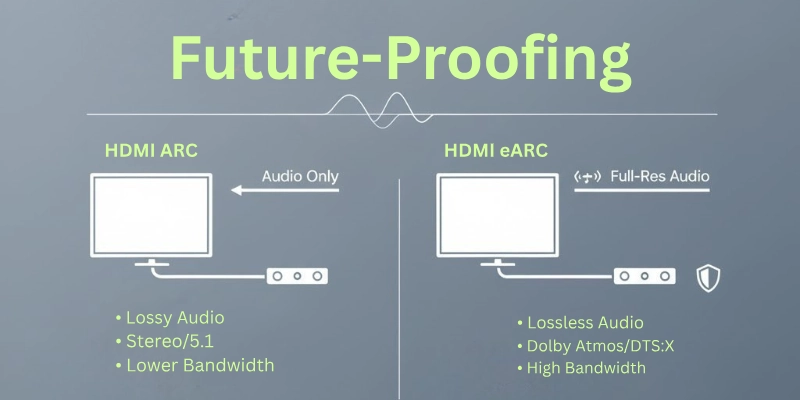
Future-Proofing with HDMI ARC
ARC is already older technology.
- It may not support newer audio formats and advanced features.
- If you upgrade other devices in the future, ARC may become outdated.
Result: Not the best choice for future upgrades.
Future-Proofing with HDMI eARC
eARC is part of the latest HDMI 2.1 standard.
- Supports modern audio formats, better syncing, and higher quality sound.
- If you plan to upgrade your home theater later, eARC will stay relevant.
Result: A better long-term investment.
The Major Difference
- ARC is good for now, but might not support new tech later.
- eARC is future-ready, making it a smarter choice for those who want to upgrade later.
HDMI ARC vs HDMI eARC – Comparison Table
Guys, here is the quick comparison table for you to take a quick overview of both ARC and eARC:
| Feature | HDMI ARC | HDMI eARC |
| Audio Quality | Compressed audio (lower quality) | Uncompressed, high-quality audio |
| Audio Formats Supported | Basic formats like Dolby Digital, DTS | Advanced formats like Dolby TrueHD, DTS-HD MA |
| Bandwidth | Limited bandwidth | Higher bandwidth for better sound |
| Cable Compatibility | Works with regular HDMI cables | Needs Ultra High-Speed HDMI cable |
| Lip Sync Correction | Basic sync, sometimes manual | Automatic and more accurate syncing |
| Device Compatibility | Works with most TVs and soundbars | Needs devices with HDMI 2.1 support |
| Ease of Setup | Very simple and beginner-friendly | Also simple, but may require newer devices |
| Control Features (CEC) | Supports HDMI-CEC (basic remote control) | Better and more stable CEC performance |
| Backward Compatibility | Compatible with older devices | Works with ARC devices, but features limited |
| Channel Support | Up to 5.1 channel audio | Up to 7.1 or more channels |
| Cost | Budget-friendly | Slightly expensive due to new tech |
| Future-Proofing | Older technology, limited future use | Modern and future-ready |
Conclusion
So guys, in this article, we have covered HDMI ARC vs eARC in great detail. We discussed all the main differences like audio quality, formats, bandwidth, cable types, cost, and more. If you’re planning a basic setup, ARC might be enough. But if you want high-quality sound and a future-ready system, go for eARC.
Also, don’t forget to check out the FAQs section below—it covers a lot of common confusions you may still have in mind.
FAQs
Here are some of the most commonly asked questions related to hdmi earc vs arc:
Yes, eARC is better than ARC. It gives you higher sound quality and supports advanced audio formats like Dolby TrueHD and DTS-HD. eARC also provides better syncing and more audio channels. It is designed for modern TVs and sound systems.
No, ARC and eARC are not the same. ARC is the older version with fewer features and lower sound quality. eARC is the upgraded version with better performance, more audio format support, and faster data transfer.
For eARC, you need an Ultra High-Speed HDMI cable. This cable supports the higher bandwidth that eARC needs to send high-quality sound. Regular HDMI cables may not give you full eARC features. So, always choose a certified Ultra High-Speed HDMI cable for the best results.
Yes, eARC can work with ARC, but only with basic functions. You won’t get high-quality sound or advanced features if one device is ARC and the other is eARC. The connection will still work, but only like normal ARC. For full benefits, both devices should support eARC.
Yes, HDMI ARC is compatible with HDMI eARC, but the features will be limited. You can still connect the devices, but only the ARC-level features will work. Advanced sound quality and formats from eARC won’t be available in this case. For the best performance, both devices should have eARC.





- Be Respectful
- Stay Relevant
- Stay Positive
- True Feedback
- Encourage Discussion
- Avoid Spamming
- No Fake News
- Don't Copy-Paste
- No Personal Attacks
- Be Respectful
- Stay Relevant
- Stay Positive
- True Feedback
- Encourage Discussion
- Avoid Spamming
- No Fake News
- Don't Copy-Paste
- No Personal Attacks
