HDMI Signal Booster: Improve Long-Distance Signals
Published: 11 Nov 2025
We all know HDMI is essential for transmitting high-quality video and audio between devices.
But did you know that long HDMI cables can cause the signal to weaken, leading to poor picture and sound quality? This is where a signal booster in HDMI becomes necessary.
A signal booster works by strengthening the HDMI signal, allowing it to travel further without losing quality. In this guide, we’ll explain what is HDMI signal booster is and how it helps maintain a flawless connection in your setup.
What is HDMI Signal Booster?
An HDMI signal booster is a tool designed to make the HDMI signal stronger. HDMI cables are used to connect different devices, such as a TV and a laptop, so you can watch videos or play games with great sound and picture.
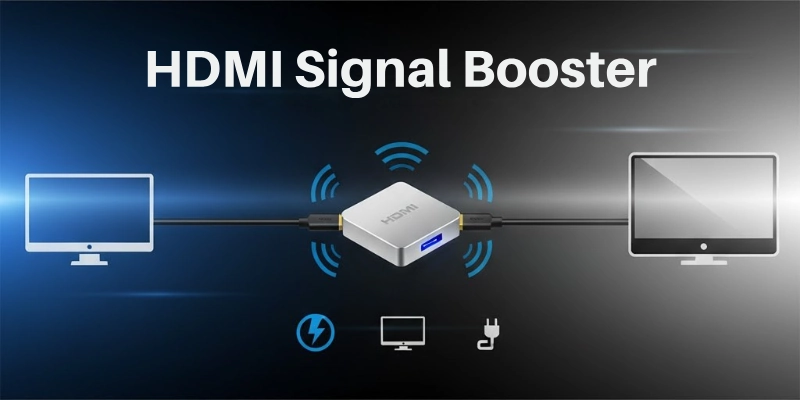
But when the cable is too long, the signal can get weaker, which causes problems like blurry images or bad sound. A signal booster fixes this by boosting the signal, ensuring that your video and audio stay clear and of good quality, no matter how far the cable stretches.
How Does HDMI Signal Booster Work?
Here’s a breakdown of how an signal booster in HDMI works:
- Signal Input: The HDMI signal from the source device (like a laptop, gaming console, or Blu-ray player) travels through the HDMI cable to the destination device (like a TV or monitor).
- Signal Detection: As the HDMI signal travels through the cable, it starts to weaken, especially over longer distances, resulting in possible picture and sound quality loss.
- Amplification: The signal booster detects this weakened signal and uses built-in electronics to amplify or increase its strength.
- Signal Boosting: The amplifier strengthens the signal without changing its original quality, making it capable of traveling further without degradation.
- Signal Output: After boosting the signal, the enhanced HDMI signal is sent to the receiving device (like your TV or projector) with improved clarity and strength.
- Continuous Signal Flow: The HDMI signal booster ensures the signal stays strong through the entire cable, preventing any interruption, distortion, or loss of quality.
This process allows for clear video and audio transmission even when the HDMI cable is very long, ensuring high-quality performance across long distances.
When Do You Need HDMI Signal Booster?
In this section, I’ll explain when HDMI signal boosters are needed. The situations are listed below:
- Long HDMI Cables: If your HDMI cable is more than 50 feet long, the signal can start to weaken. A booster helps keep the signal strong.
- Poor Picture or Sound Quality: If you notice blurry pictures or distorted sound, it may be due to weak HDMI signals, and a booster can fix this.
- Multiple Devices: When connecting several devices with long HDMI cables (like in a home theater system or office setup), a booster ensures the signal doesn’t lose quality.
- High-Resolution Content: For 4K or 8K content, the signal needs to be stronger to carry all the data. A booster helps maintain high-quality video.
- Older HDMI Equipment: If you’re using old HDMI cables or devices that don’t handle long-distance signals well, a signal booster will help improve performance.
- Multiple Room Setups: In setups where the TV or monitor is far from the source device (like a projector setup), the signal booster helps maintain clear video and sound.
- Inconsistent Connections: If your HDMI connection drops frequently or doesn’t stay stable, a signal booster can help by boosting the signal.
Benefits of Using an HDMI Signal Booster
Here are the key benefits of using an HDMI signal booster, explained simply:
- Improves Picture Quality: The booster ensures that your video remains clear and sharp, even when using long HDMI cables.
- Enhances Sound Clarity: It helps keep the audio crisp and clear, avoiding issues like distorted or low-quality sound.
- Works with Long Cables: If your HDMI cable is long, the booster keeps the signal strong, so you don’t lose video or audio quality.
- Supports High-Resolution Content: For 4K and 8K videos, the booster ensures the signal is strong enough to support high-definition content.
- Stable Connection: It prevents your HDMI connection from dropping or becoming unstable, so you can enjoy smooth viewing or gaming.
- Flexible Setup Options: The booster allows you to set up your devices farther apart while maintaining strong signal quality.
- Saves Money: Instead of buying new cables or equipment, a signal booster is a cost-effective way to improve your setup.
Types of HDMI Signal Boosters
Here are the different types of HDMI signal boosters:
- Inline HDMI Signal Boosters: These are small devices that go between your HDMI source (like a laptop) and your display (like a TV). They help make the signal stronger as it moves through the cable.
- External HDMI Signal Boosters: These are bigger devices that connect to your HDMI setup. They work well when you need to boost signals over longer distances or with multiple devices.
- Active HDMI Signal Boosters: These boosters need power, either from a USB or a plug. They use electronics to make the signal stronger, which helps with long cables and high-quality video.
- Passive HDMI Signal Boosters: These are simpler and don’t need power. They work by relying on the quality of the HDMI cable to boost the signal. They’re good for shorter cables.
- HDMI Extenders with Signal Boosting: These devices not only boost the signal but also let you extend it over long distances. They’re great for big setups like home theaters or offices.
Each type of HDMI signal booster has its use depending on the distance and setup.
HDMI Signal Booster vs. HDMI Extender
Here’s a simple comparison between an HDMI Signal Booster and an HDMI Extender:
Purpose:
- A signal booster strengthens the HDMI signal, helping it stay clear and strong over longer cables.
- An extender does more than just boost the signal—it also extends the signal over much greater distances, sometimes using other cables like CAT5 or CAT6.
Usage:
- A signal booster is perfect when you want to improve the signal quality over moderate distances (usually under 50 feet) but don’t need to extend the cable length.
- An extender is ideal for situations where you need to send an HDMI signal over very long distances, like in large home theaters or office setups.
Power:
- Some signal boosters require power (active) to amplify the signal, while others don’t need any power (passive).
- Extenders usually need power to work, as they use additional technology to extend the signal over long distances.
Distance:
- Signal boosters work well for HDMI cables up to about 50 feet, making them a good option for moderate lengths.
- Extenders can push the HDMI signal over much longer distances, up to 150 feet or more, depending on the model and the type of cable used.
So guys, if you just need to boost the signal quality over a moderate length, an HDMI signal booster is the way to go. If you need to send the HDMI signal over a very long distance, an HDMI extender will be more suitable for your needs.
How to Choose Right HDMI Signal Booster?
Here is how you can select the best HDMI singal booster:
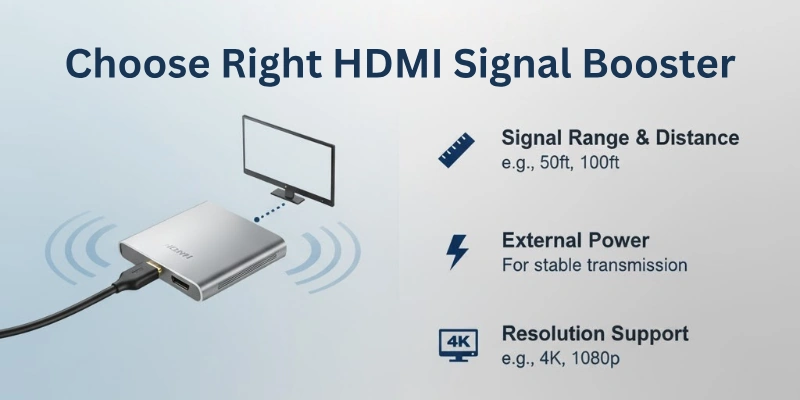
- Check Cable Length: If your HDMI cable is long (over 50 feet), you’ll need a signal booster to keep the signal clear.
- Match HDMI Versions: Make sure the booster works with your HDMI version (like 4K or 8K).
- Decide on Power: Some boosters need power (active), while others don’t (passive). Active boosters work better for long cables.
- Look for Good Signal Quality: Choose a booster that keeps your video and sound clear without any interruptions or blurring.
- Easy Setup: Pick a booster that’s simple to install, especially if you’re not familiar with technical setups.
- Stick to Your Budget: Choose a booster that fits your budget but also meets your needs, like 4K support if needed.
- Extra Features: Some boosters come with extra features like protection from power surges or support for multiple devices.
This should make it easier to choose the right HDMI signal booster for your needs!
Common Issues with HDMI Signal Boosters
These issues can affect the performance of your HDMI signal booster:
- Signal Loss or Weak Signal: Sometimes the booster may not improve the signal enough, especially if it is not powerful enough for long cables.
- Compatibility Problems: Some HDMI signal boosters may not work well with certain devices or HDMI versions, like 4K or 8K content.
- Power Supply Issues: If the booster requires power, sometimes it may not get enough power, causing the signal to be weak or not work at all.
- Overheating: Active HDMI boosters that need power can sometimes overheat, leading to poor performance or even damage to the device.
- Audio and Video Distortion: A poor-quality HDMI signal booster can lead to audio or video problems, like distortion, lag, or blurry images.
- Limited Distance: Even with a signal booster, there may still be a limit to how far the HDMI signal can travel without losing quality.
- Setup Complexity: Some HDMI boosters may be tricky to install, especially if you’re not familiar with the technology.
Conclusion
In this article, we have shared what an HDMI signal booster is and why it is useful. A signal booster can help fix problems like blurry images or poor sound when using long HDMI cables. Make sure to pick a booster that fits your setup.
Check the length of your cables and the type of HDMI you are using. With the right signal booster, you can enjoy a stronger and clearer HDMI connection. It’s a simple way to improve your media experience.
FAQs
Here are some of the most commonly asked questions related to HDMI signal boosters:
An HDMI signal booster helps make the HDMI signal stronger. It keeps the video and sound quality clear when you use long HDMI cables. This is useful in setups like home theaters or large conference rooms.
HDMI signals work well up to about 25 to 30 feet. After that, the signal can weaken, causing bad picture or sound. A booster helps keep the signal strong over longer distances, like 50 feet or more.
Yes, you can use a signal booster with most HDMI cables. But, using good-quality cables will help the booster work better. Cheap cables might still cause problems, even with a booster.
An active booster needs power, usually from a USB port, to make the signal stronger. It works better over long distances. A passive booster doesn’t need power and is simpler, but it’s best for shorter distances.
Yes, many HDMI signal boosters work with 4K video. Make sure the booster you choose supports 4K, as older models may not. If you want to keep high video quality, pick a booster that supports 4K.
A good HDMI signal booster won’t reduce video quality. Instead, it helps keep the picture sharp and clear by maintaining a strong signal. It ensures that the video stays crisp and smooth, even when the cable is long.
Yes, HDMI signal boosters also help improve sound quality. They prevent audio dropouts and distortion that can happen over long cable runs. This ensures that the sound stays clear and in sync with the video.
If you notice that the picture or sound quality is poor over long HDMI cables, it’s a sign you might need a booster. Watch for issues like blurry video, delayed or missing sound, or a complete loss of signal—these are signs the signal needs boosting.
Most HDMI signal boosters work with all HDMI devices like TVs, projectors, gaming consoles, and computers. Just make sure the booster matches the type of HDMI you’re using (like HDMI 2.0 or 2.1).
Yes, HDMI signal boosters improve both video and audio. They keep both the picture and sound clear, so you don’t lose quality, especially in setups that need high-quality video and sound.

- Be Respectful
- Stay Relevant
- Stay Positive
- True Feedback
- Encourage Discussion
- Avoid Spamming
- No Fake News
- Don't Copy-Paste
- No Personal Attacks
- Be Respectful
- Stay Relevant
- Stay Positive
- True Feedback
- Encourage Discussion
- Avoid Spamming
- No Fake News
- Don't Copy-Paste
- No Personal Attacks
