Sampling Rate in HDMI: Basics and Easy Explanation
Published: 13 Nov 2025
Have you ever wondered what is sampling rate in HDMI? If yes, then this blog is for you. Sampling rate plays an important role in HDMI. It helps in improving both sound and picture quality when using HDMI devices.
In this blog, I will explain what is sampling rate in HDMI in a simple way. You will learn:
- What is audio sampling rate in HDMI
- What is video sampling rate in HDMI (also called chroma subsampling)
Let’s get started!
What is Sampling Rate in HDMI?
Sampling rate in HDMI means how many times audio or video signals are captured and sent every second through an HDMI cable. It directly affects the sound and picture quality you get on your screen or speakers.
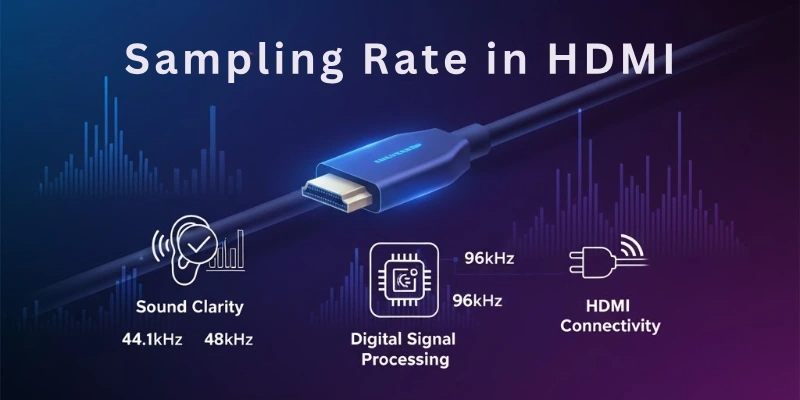
In simple words, sampling rate in HDMI tells us how much detail or clarity will be in the audio and video when using HDMI.
Why is Sampling Rate Important in HDMI?
The higher the sampling rate, the more detailed and clear the sound and video will be. A lower sampling rate may save data but can reduce quality.
Sampling rate in HDMI is mainly used in two areas:
- Audio Sampling Rate
- Video Sampling Rate (also called Chroma Subsampling)
Let’s understand both in detail.
Audio Sampling Rate in HDMI
Audio sampling rate in HDMI means how many audio samples (or sound signals) are captured and sent every second through the HDMI cable.
It is measured in kilohertz (kHz). The higher the kHz, the better and clearer the sound quality.
Common Audio Sampling Rates in HDMI:
- 32 kHz → Basic sound quality
- 44.1 kHz → CD quality sound
- 48 kHz → Standard in movies & TV shows
- 96 kHz → High-quality sound
- 192 kHz → Studio-level sound quality
Why Does Audio Sampling Rate Matter in HDMI?
Audio sampling rate in HDMI is very important because it directly affects the sound quality you hear from your TV, speakers, or sound system.
A higher audio sampling rate means the sound is captured in more detail. This helps you hear clear, smooth, and natural audio.
On the other hand, a lower sampling rate means less detail in sound, which may feel flat or not very clear.
In simple words:
- High sampling rate = Clearer, richer, and more detailed sound
- Low sampling rate = Basic or average sound quality
For example:
If you are watching a movie or playing a game on a home theater using HDMI, a higher audio sampling rate will give you a more realistic and immersive sound experience. You will feel like the sound is happening all around you, just like in real life.
That’s why audio sampling rate in HDMI plays a key role in creating a better listening experience.
Video Sampling Rate in HDMI
Video sampling rate in HDMI means how much color and detail are captured from a video signal and sent through the HDMI cable to your screen.
It decides the quality of colors and clarity you see in videos. Higher video sampling rate means more color detail and a sharper picture. Lower video sampling rate means less color detail but smaller data size.
How is Video Sampling Rate in HDMI Related to Chroma Subsampling?
In HDMI, the video sampling rate is closely connected with a technique called Chroma Subsampling.
Chroma Subsampling is used to control the video sampling rate by reducing some color information. This helps in saving storage and bandwidth without affecting brightness or overall video quality too much.
In simple words:
Chroma Subsampling = Color Compression Method used to manage Video Sampling Rate in HDMI.
Common Video Sampling Formats in HDMI
There are 3 popular chroma subsampling formats used in HDMI to control video sampling rate:
| Format | Compression Level | What it Means |
| 4:4:4 | No compression | Best quality, all color details are sent |
| 4:2:2 | Medium compression | Good quality, some color details are reduced |
| 4:2:0 | Highest compression | Average quality, more color information is reduced |
Why Does Video Sampling Rate Matter in HDMI?
Video sampling rate in HDMI is very important because it directly affects:
- Color Sharpness
- Picture Clarity
- Fine Details in Videos
In Simple Words:
→ Higher video sampling rate (like 4:4:4) = Sharp, clear, and colourful video
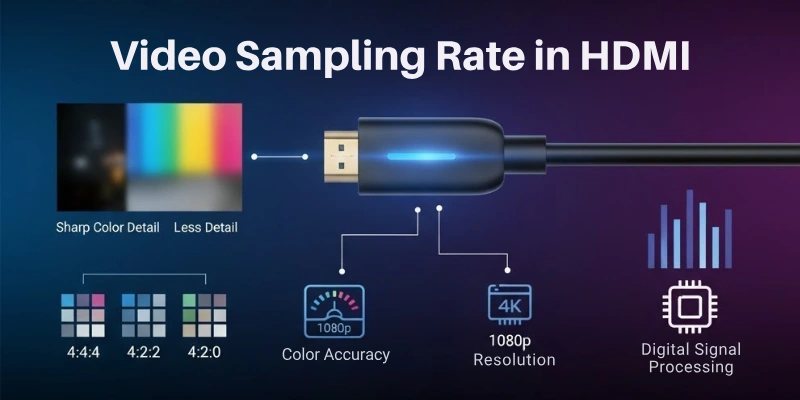
→ Lower video sampling rate (like 4:2:0) = Slightly less colour detail but smaller file size
Example:
- 4:4:4 → Best for computers, gaming monitors, graphic designing (text and small details look very sharp)
- 4:2:2 → Great for movies, TV shows, and normal video watching
- 4:2:0 → Best for online streaming where saving data is important
Why Sampling Rate Matters in HDMI Devices
Sampling rate is important for HDMI devices because it affects how well your device works, not just for sound and video but for everything. It affects how smooth the experience is and how well the devices work together.
Let’s look at some reasons why sampling rate matters for HDMI devices:
1. Better Sound and Picture Quality
Higher sampling rates give you better sound and clearer video. The more data sent, the better the sound and picture will be. If you want great sound and clear video, it’s important to choose the right sampling rate for your HDMI device.
2. Smooth Data Transfer
When the sampling rate is higher, more data has to travel between your devices. This can slow things down if your devices aren’t ready for it. If your devices can handle a higher sampling rate, everything will work faster and smoother, with less lag.
3. Device Compatibility
Not all HDMI devices work with the same sampling rates. Older cables or devices might not support high sampling rates. So, it’s important to make sure your devices and cables can handle the rate you need to get the best quality.
4. Saving Bandwidth
Higher sampling rates use more bandwidth, which is the amount of data your devices send. If you’re streaming or using a device with slower internet, using a lower sampling rate can help avoid buffering or lag.
5. Balancing Quality and Performance
Higher sampling rates give you better quality, but they also use up more resources. If you want the best quality, you should use a higher sampling rate. But if your device can’t handle it or if you want to save bandwidth, using a lower rate can work better.
6. Cost and Power
Devices that support higher sampling rates might be more expensive and use more power. If you don’t need the highest quality, using a lower sampling rate can help you save money and energy.
Final Words
In this article, we’ve covered what sampling rate in HDMI means and why it’s important for both audio and video quality. Make sure to choose the right sampling rate for your devices to get the best performance.
Also, don’t forget to check the FAQ section for more answers to your questions.
FAQs
Here are some of the most commonly asked questions related to HDMI sampling rate:
The sampling rate in HDMI for audio refers to how often sound is captured per second. A higher rate means clearer and more detailed sound. For home theater or gaming, it improves the overall audio experience.
The sampling rate in HDMI video affects color detail through chroma subsampling. A higher rate keeps the image sharp and vibrant. Lower rates reduce color quality and make the picture look blurry.
Yes, an old or low-quality HDMI cable might not support higher sampling rates. This can result in lower video and audio quality. Using a high-quality cable ensures the best experience.
A higher sampling rate can improve quality, but it also uses more power and bandwidth. If your device can’t handle it, you might experience lag. It’s best to choose a rate that fits your device’s capabilities.
HDMI 2.1 supports the highest sampling rates. It can handle more bandwidth for 4K and 8K video, as well as better sound. For the best performance, use devices that support HDMI 2.1.
Yes, the sampling rate affects streaming quality. A higher rate improves sound and picture, but requires a faster internet connection. If your internet speed is slower, using a lower rate can avoid buffering.
4:4:4 keeps full color data, making the picture sharper and clearer. 4:2:0 reduces color data to save bandwidth. For the best image quality, 4:4:4 is ideal, but 4:2:0 works well with lower bandwidth.
Yes, changing the sampling rate can make the sound clearer. A higher rate gives better sound detail. However, your device needs to support it for the best improvement.


- Be Respectful
- Stay Relevant
- Stay Positive
- True Feedback
- Encourage Discussion
- Avoid Spamming
- No Fake News
- Don't Copy-Paste
- No Personal Attacks
- Be Respectful
- Stay Relevant
- Stay Positive
- True Feedback
- Encourage Discussion
- Avoid Spamming
- No Fake News
- Don't Copy-Paste
- No Personal Attacks
