What are Active HDMI Cables? Learn with Us
Published: 30 Nov 2025
If you use HDMI cables, you already know how important they are for high-quality video and audio transmission. But did you know that not all HDMI cables are the same? Active HDMI Cables are a special type designed to send signals over long distances without losing quality.
In this guide, we will explain what are active hdmi cables, how they work, their advantages, and why they might be the best choice for your setup.
What is Active HDMI Cable?
An active HDMI cable is a special HDMI cable that helps send video and sound over long distances without losing quality. It has a built-in booster that makes the signal stronger so the picture and sound stay clear.
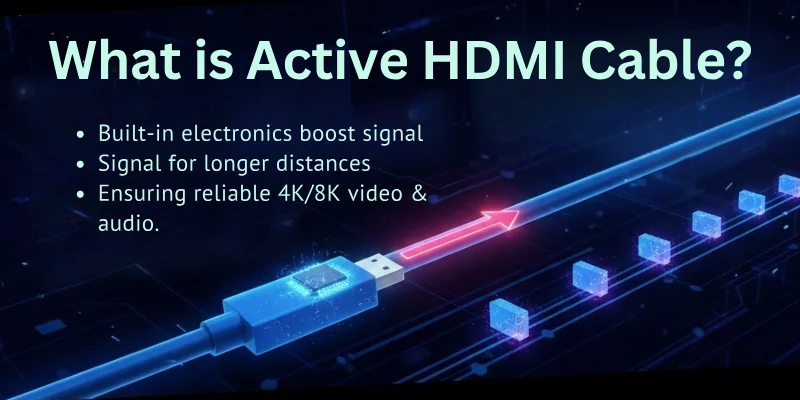
Unlike a Passive HDMI Cable, which just carries the signal as it is, an active HDMI cable improves it to avoid blurry or weak signals.
Because of this, it needs extra power, usually from a USB connection, to work properly. Active HDMI cables are useful for home theaters, gaming, and setups that need long cables.
How Does Active HDMI Cable Work?
Here is a step-by-step working of an active HDMI cable:
Signal Starts from the Source
- The HDMI cable is connected to a source device like a TV, gaming console, laptop, or Blu-ray player.
- The device sends a video and audio signal through the HDMI cable.
Built-in Booster Strengthens the Signal
- Inside the cable is a small booster chip (also called a signal amplifier).
- This chip strengthens the signal to travel a long distance without losing quality.
Power is Supplied to the Booster
- The booster needs extra power to work.
- Some active HDMI cables take power from the HDMI port, but others need a USB connection for power.
Signal Travels Through the Cable
- The strengthened signal moves through the HDMI cable without losing quality.
- Even if the cable is very long (up to 100 feet or more), the signal remains clear.
Signal Reaches the Display Device
- The HDMI cable connects to a display device like a TV, projector, or monitor.
- Because of the booster, the display gets a strong signal, showing a clear and smooth picture with perfect sound.
Main Components in Active HDMI Cable
The major parts:
- Source Device – The device that sends the video/audio signal (TV box, laptop, gaming console, etc.).
- Built-in Booster (Signal Amplifier) – A small chip inside the cable that strengthens the signal.
- Power Source – Some cables take power from the HDMI port, while others use a USB connection.
- Cable Wires – Carry the signal from the source to the display device.
- Display Device – The screen where the video and audio are shown (TV, monitor, projector, etc.).
Active HDMI Cable vs. Passive HDMI Cable
Here are some of the major key differences between these different HDMI cables, active and passive:
| Feature | Active HDMI Cable | Passive HDMI Cable |
| Signal Booster | Yes, built-in amplifier | No, just carries the signal |
| Maximum Length | Up to 100 feet (or more) | Usually 15-25 feet |
| Power Requirement | Needs extra power (USB or HDMI port) | No extra power needed |
| Signal Strength | Strong over long distances | Weakens over long distances |
| Best for | Home theaters, gaming, long-distance setups | Short connections, basic use |
| Cost | More expensive | Cheaper |
| Directionality | Works in one direction (input to output) | Works both ways |
Which One Should You Choose?
- Use an Active HDMI Cable if you need a long cable (over 15-25 feet) or want to ensure high-quality video and audio without signal loss.
- Use a Passive HDMI Cable if your cable is short and does not need extra power to keep the signal strong.
Advantages & Disadvantages of Using Active HDMI Cable
Here are the major benefits and limitations of an active HDMI cable:
Let’s start.
Pros of Active HDMI:
- Sends clear video and audio over long distances.
- Prevents signal loss and distortion.
- Supports high resolutions like 4K and 8K.
- Works well for home theaters, gaming, and professional setups.
- Ideal for long HDMI cable runs (up to 100 feet or more).
- Ensures smooth and lag-free performance.
Cons of Active HDMI:
- Needs extra power (USB or HDMI port).
- More expensive than passive HDMI cables.
- Works only in one direction (has a fixed input and output side).
- Not needed for short-distance connections.
- May not work well with some HDMI devices that don’t provide enough power.
When Should You Use Active HDMI Cable?
In some situations, it becomes necessary to use an active HDMI cable to keep the video and sound clear. Let’s see when you should use it.
You Should Use an Active HDMI Cable When:
- The HDMI cable is longer than 15-25 feet.
- You need to send a signal over a long distance without losing quality.
- You want to watch movies or play games in 4K or 8K resolution.
- You are setting up a home theater or professional display system.
- A passive HDMI cable is not working well due to signal loss.
- You notice blurry, flickering, or no signal issues with a long cable.
- You are connecting a projector, TV, or monitor far from the source device.
What to Check Before Buying Active HDMI Cable?
Here are the key things to look for when choosing an Active HDMI Cable to get the best performance.
Important Features to Look For:
- Cable Length – Choose the right length based on your setup (longer than 15-25 feet).
- Resolution Support – Make sure it supports 4K, 8K, or higher resolutions if needed.
- Refresh Rate – Look for 60Hz, 120Hz, or 144Hz for smooth video and gaming.
- HDR Support – Needed for better colors and contrast in movies and games.
- Power Source – Check if it needs USB power or works with just the HDMI port.
- Audio Support – Should support Dolby Atmos, DTS:X, and other high-quality sound formats.
- Build Quality – A strong, durable cable with gold-plated connectors lasts longer.
- Compatibility – Ensure it works with TVs, projectors, gaming consoles, and PCs.
How to Set Up and Use an Active HDMI Cable?
Setting up an Active HDMI Cable is easy, but you need to follow the correct steps to get the best performance. Here’s how to do it:
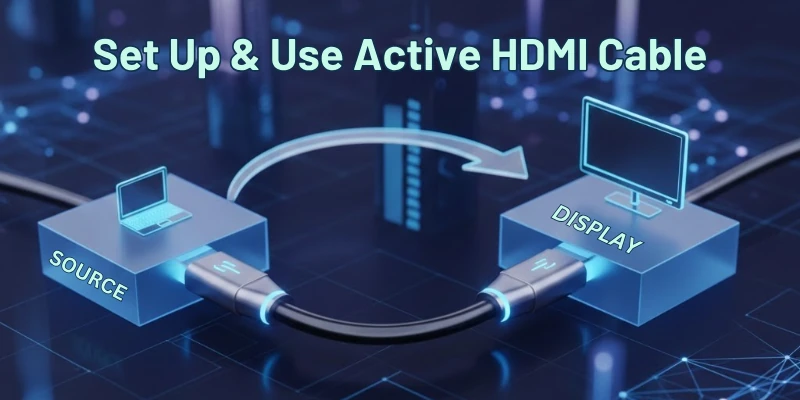
Check the Cable Ends
- Active HDMI cables have a specific input and output side.
- Look for labels like “Source” (Input) and “Display” (Output) on the cable.
Connect to the Source Device
- Plug the Source end into the device sending the signal (TV box, laptop, gaming console, etc.).
Connect to the Display Device
- Plug the Display end into the TV, monitor, or projector.
Provide Power (If Needed)
- Some active HDMI cables need extra power.
- If required, plug the USB power cable into a USB port on the TV or another power source.
Select the Correct HDMI Input
- Turn on your TV or monitor and select the correct HDMI input using the remote.
Check the Display
- If the picture and sound are clear, the setup is complete.
- If there are issues, check the cable connections and power source.
Best Active HDMI Cables to Buy
Here are some good options for Active HDMI Cables based on quality, performance, and price.
Good All-Around Choices:
- Cable Matters – A reliable brand with different length options.
- Monoprice – Offers great value and high-quality cables.
For Long Distances (Fiber Optic HDMI Cables):
- iBirdie – Known for long, high-performance fiber optic cables.
- Search for “Fiber Optic HDMI Cable” for more options.
Budget-Friendly Options:
- Amazon Basics – Affordable, but check the specifications before buying.
Key Things to Check Before Buying:
- Length – Choose the right size for your setup.
- HDMI Version – Match your device’s requirements (e.g., HDMI 2.0 or 2.1).
- “Active” in the Name – Ensure it is an active HDMI cable and not passive.
To find the best one, search on Amazon using brand names and keywords like “Active HDMI [length]”.
Final Thoughts
In this article, we explored everything about Active HDMI Cables, including how they work, their advantages, when to use them, and how to set them up.
An active HDMI cable is a great choice if you need a long HDMI cable for high-quality video and audio. Personally, I recommend checking the cable length and HDMI version before buying.
If you’re ever confused about HDMI cables, don’t worry! My site covers everything about HDMI technology, just enjoy every connection with my expert guides!
FAQs
Here are some of the most commonly asked questions related to active HDMI:
Active HDMI cables are designed for long distances, usually over 15-25 feet. For shorter distances, a passive HDMI cable works just fine and does not require extra power. However, if you already have an active HDMI cable, you can still use it for short connections without any issue.
Yes, most active HDMI cables require extra power to boost the signal over long distances. Some get power directly from the HDMI port, while others need a USB connection. Always check the cable details to see if external power is required for proper functioning.
Active HDMI cables are compatible with most devices, including TVs, monitors, gaming consoles, and projectors. However, some devices may not provide enough power for the cable to work properly. If you face issues, try using a USB-powered active HDMI cable or check your device’s output power.
Unlike passive HDMI cables, active cables have a “Source” end (input) and a “Display” end (output). This is because they process and boost the signal in one direction only. If you connect them the wrong way, they won’t work, so always follow the labels on the cable.
It depends on your needs! A passive HDMI cable is enough if your HDMI connection is short (under 15 feet). But for longer distances, an active HDMI cable prevents signal loss and maintains high-quality video and audio. So, it’s not about being “better”—using the right cable for the right situation.

- Be Respectful
- Stay Relevant
- Stay Positive
- True Feedback
- Encourage Discussion
- Avoid Spamming
- No Fake News
- Don't Copy-Paste
- No Personal Attacks
- Be Respectful
- Stay Relevant
- Stay Positive
- True Feedback
- Encourage Discussion
- Avoid Spamming
- No Fake News
- Don't Copy-Paste
- No Personal Attacks
