Convert HDMI to AV: Easy Steps for Setup Guide
Published: 4 Jan 2026
In today’s world, HDMI is the most commonly used connection for modern devices like TVs, laptops, gaming consoles, and streaming boxes. However, sometimes, you may need to connect an HDMI device to an older TV or monitor that only has AV or RCA inputs (the red, white, and yellow cables).
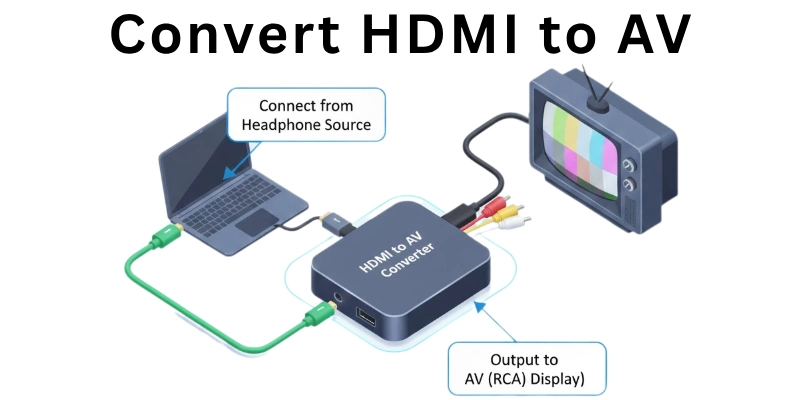
In this article, we’ll explain how to convert HDMI to AV (also called RCA) easily, why you may need this conversion, what tools you need, and how to set it up step-by-step.
Why Do You Need to Convert HDMI to AV?
There are many situations where you may need to convert HDMI to AV or RCA connection.
This usually happens when you want to connect a modern HDMI device to an older TV or monitor that only supports AV input (yellow, red, and white ports).
Since HDMI uses a digital signal and AV uses an analog signal, they are not directly compatible. That’s why you need a converter.
Here are some common reasons for converting HDMI to AV:
- You have an older TV that doesn’t have an HDMI port.
- You want to use a streaming device (like a Fire Stick or Chromecast) on an old TV.
- You want to connect a new gaming console or laptop to an AV projector or TV.
- You’re setting up a school, workshop, or training room with older display systems.
- You want to repurpose your old TV for CCTV, DVD players, or as a second screen.
In all these cases, a HDMI to AV or RCA connection helps bridge the gap between new technology and old devices.
What is AV or RCA Connection?
Before you learn how to convert HDMI to AV or RCA connection, it’s important to understand what AV or RCA actually means.
AV (Audio/Video), also called RCA, is an older type of analog connection used in TVs, DVD players, VCRs, and gaming consoles. It works through three colored cables:
- Yellow – Carries the video signal
- White – Carries the left audio channel
- Red – Carries the right audio channel
These three cables connect to matching colored ports on the back or side of older TVs and monitors. RCA connections were commonly used before HDMI became popular and are still found in many older devices.
A special converter is needed to change the signal since RCA is an analog signal and HDMI is digital. That’s why people search for ways to convert HDMI to AV or RCA connection when dealing with mixed-generation devices.
Can HDMI Be Directly Connected to AV?
No, HDMI cannot be directly connected to AV or RCA. This is because both signals are entirely different in format and technology:
- HDMI uses a digital signal for high-quality audio and video.
- AV (RCA) uses an analog signal for basic audio and video transmission.
These two types of signals are not compatible with each other. That means you can’t just use a simple cable to connect HDMI to RCA — it won’t work.
You need a HDMI to AV converter box that changes the digital HDMI signal into an analog AV signal. This is the only proper way to convert HDMI to AV or RCA connection successfully.
So, if you try to connect them without a converter, there will be no picture or sound because the signal formats don’t match.
What Do You Need to Convert HDMI to AV?
Here’s a list of items you’ll need:
- HDMI to AV/RCA Converter Box – Converts digital HDMI signal to analog AV signal.
- RCA Cables (Red, White, Yellow) – To connect the converter to your TV’s AV ports.
- HDMI Cable – To connect your device (laptop, console, etc.) to the converter.
- Power Cable or USB Adapter – To power the converter (some need external power).
- AV-Compatible TV or Monitor – A display that has RCA input ports.
How to Connect HDMI to AV or RCA – Step-by-Step Guide
Follow these easy steps to convert HDMI to AV or RCA connection successfully:
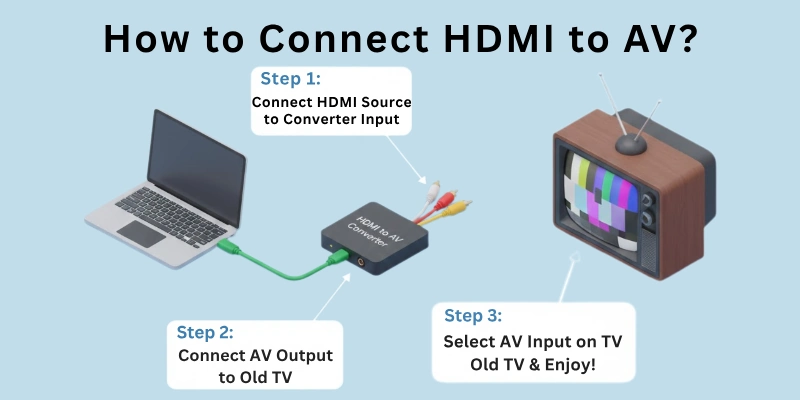
Step 1: Plug in the HDMI Cable
Connect one end of the HDMI cable to your device (laptop, streaming box, gaming console, etc.).
Step 2: Connect the HDMI Cable to the Converter
Plug the other end of the HDMI cable into the HDMI input port of the HDMI to AV converter box.
Step 3: Insert RCA Cables into the Converter
Take your RCA cables (red, white, yellow) and plug them into the matching AV output ports on the converter box.
- Yellow = Video
- White = Left Audio
- Red = Right Audio
Step 4: Connect RCA Cables to Your TV
Now connect the other ends of the RCA cables into the AV input ports of your TV or monitor.
Step 5: Power the Converter
Connect the power cable or USB power adapter to the converter. Make sure it’s turned ON if it has a switch.
Step 6: Select the AV Mode on TV
On your TV remote, choose the correct AV input/source mode (AV1, AV2, or Video) to display the content.
Step 7: Test the Connection
Your HDMI device should now display video and sound on your AV TV. If it doesn’t work, double-check all cables and power supply.
Important Things to Keep in Mind When Converting HDMI to AV or RCA
When you convert HDMI to AV or RCA connection, keep these important points in mind to avoid problems:
- Check compatibility – Make sure your converter supports the resolution of your HDMI device (like 720p or 1080p).
- Converters are one-way – Most converters only work from HDMI to AV, not the other way around.
- Power supply is required – Most HDMI to AV converters need an external power source to work properly.
- Choose a good-quality converter – Cheap converters may cause poor video or audio quality.
- Use the correct input mode on your TV – Always select the correct AV source/input using your TV remote.
- RCA cables must match the color ports – Plug yellow into yellow, red into red, and white into white.
- No HD output on old TVs – AV signal is analog, so don’t expect HD quality even if the source is HDMI.
- Audio delay can happen – Some converters may have a slight delay in sound; choose a good model to avoid this.
- Converters do not upscale or improve quality – They only change signal format, not resolution.
Conclusion
In this article, we explained everything you need to know about how to convert HDMI to AV or RCA connection in a simple, step-by-step way. Whether you want to connect a modern HDMI device to an old TV or repurpose older equipment, using the right converter makes the process easy and effective.
Just make sure you have the correct tools, follow the connection steps properly, and remember important tips to avoid common issues. This method helps you bridge the gap between digital and analog technology without buying a new TV or monitor.
If you still have questions about converting HDMI to AV or RCA, feel free to ask in the comments—we’re here to help!
FAQs
Here are some of the most commonly asked questions related to HDMI to AV and RCA connections:
No, you cannot connect HDMI to AV directly without a converter. HDMI uses a digital signal, while AV uses an analog signal. These two formats are not compatible on their own. A converter is needed to change the signal from digital to analog.
There could be a few reasons for this issue. First, check if all cables are connected properly in the right ports. Make sure the converter has power and your TV is set to the correct AV input mode. Also, confirm that your device is working and sending an HDMI signal. Sometimes, restarting everything helps fix the issue.
No, the converter does not improve video quality. It only changes the signal format from HDMI to AV. Since AV is analog, the picture quality depends on your old TV’s capability. Even if your device sends HD output, the TV will show only standard definition.
Sometimes, low-quality converters may cause a delay in sound. This means the video plays first, and audio comes slightly late. It’s best to choose a good-quality HDMI to AV converter to avoid this problem. Also, check the RCA cables, if they are loose or faulty, they may cause issues.
Yes, most HDMI to AV converters need an external power source to work. They usually come with a USB cable or a small power adapter. Without power, the converter won’t transmit the signal properly. Make sure to plug in the power cable before testing your setup.


- Be Respectful
- Stay Relevant
- Stay Positive
- True Feedback
- Encourage Discussion
- Avoid Spamming
- No Fake News
- Don't Copy-Paste
- No Personal Attacks
- Be Respectful
- Stay Relevant
- Stay Positive
- True Feedback
- Encourage Discussion
- Avoid Spamming
- No Fake News
- Don't Copy-Paste
- No Personal Attacks
