Fix Xbox Series HDMI Port Issues: Easy Repair Guide
Published: 24 Sep 2025
Are you facing display problems on your Xbox? It might be due to a damaged HDMI port. Many gamers often experience HDMI issues that stop the Xbox from connecting properly to the TV screen. This is a common problem and can happen with different Xbox models.
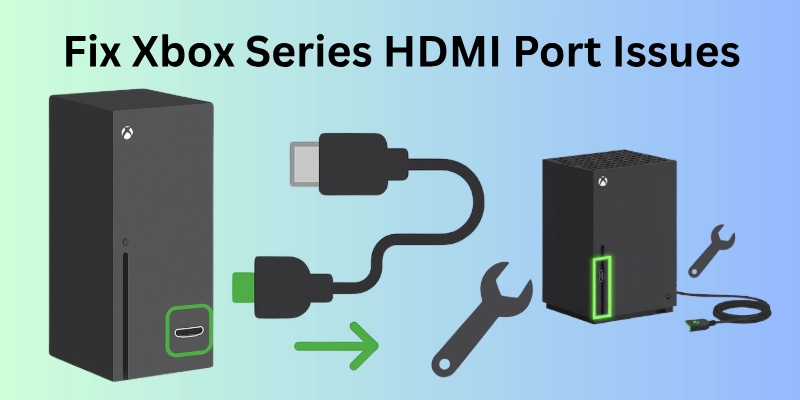
Whether you own an Xbox One, Xbox One S, Xbox One X, Xbox Series S, Xbox Series X, or even an Xbox 360, these consoles can face HDMI-related problems over time.
If your screen is blank, flickering, or showing “No Signal,” it’s time to consider Xbox HDMI repair.
A damaged HDMI port can affect your entire gaming experience. In this guide, we will help you understand everything about HDMI Xbox repair — from the causes to fixing methods. We’ll also talk about options for Xbox HDMI port repair near me, so you can find local help if needed.
Let’s begin with understanding why HDMI problems happen.
Common Signs of a Faulty HDMI Port
Before you decide to repair your Xbox, it’s important to understand the signs of a damaged HDMI port. A faulty HDMI port can cause many display issues that make gaming impossible.
Here are the most common signs:
- No display on the screen: Your Xbox is powered on, but nothing shows up on the TV.
- Flickering or distorted video: The screen keeps blinking, or the picture looks broken or unclear.
- “No Signal” error: The TV shows a message saying “No signal” even when the Xbox is connected.
- Loose HDMI cable fit: The HDMI cable does not stay firmly in the port or keeps falling out.
If you are facing these problems, your console may need HDMI Xbox One repair or an HDMI fix for Xbox Series X. These signs usually mean the HDMI port is damaged or not working properly.
In the next section, we’ll explore why this happens and how you can fix it.
Causes of HDMI Port Damage on Xbox Consoles
Now that you know the signs of a faulty HDMI port, let’s look at the common reasons why it gets damaged. HDMI ports on Xbox consoles can stop working for many reasons — and most of them happen without you even realizing it.
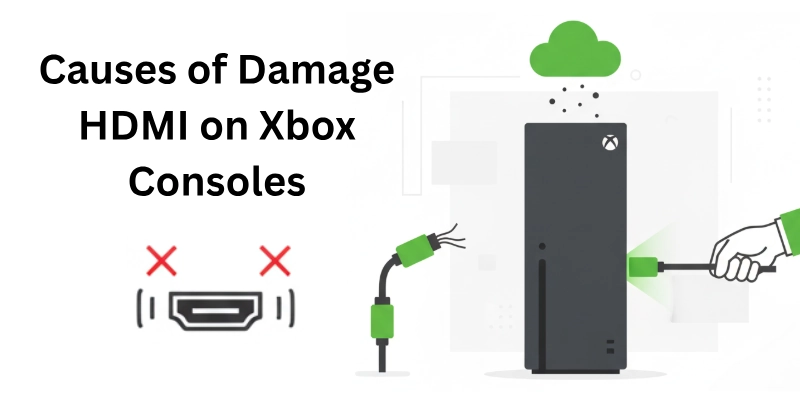
Here are the main causes:
- Physical damage: This is one of the most common reasons. If someone accidentally pulls the HDMI cable too hard or drops the console while it’s plugged in, the HDMI port can get damaged.
- Wear and tear: Over time, constant plugging and unplugging of the HDMI cable can loosen or damage the port.
- Bent or broken pins: Inside the HDMI port, there are small metal pins. These pins can get bent or broken, making it hard for the cable to connect properly.
- Console overheating: If your Xbox gets too hot while playing for long hours, it may damage internal parts — including the HDMI port.
Whether it’s your Xbox One, Xbox Series S, Xbox Series X, or even Xbox 360, these issues can affect any model. That’s why HDMI Xbox repair is often needed for many gamers today.
Xbox Models Affected by HDMI Issues
HDMI problems are not limited to one type of Xbox console. Many models, from older to newer generations, can face HDMI port issues.
Here’s a quick look at the most commonly affected models:
- Xbox 360: Though it’s an older model, Xbox 360 repairing is still needed by many users today. HDMI port damage can happen due to years of use or accidental damage.
- Xbox One: This model is known for having HDMI port issues, especially due to loose cable connections or physical damage. Many users search for Xbox One HDMI repair when their screen goes black or shows a “No Signal” error.
- Xbox One S: Slim and compact, but still not fully safe from HDMI problems. Loose HDMI cable fit is a common issue here.
- Xbox One X: This powerful version can also suffer from HDMI damage over time, especially if it’s often moved or unplugged roughly.
- Xbox Series S: The newer Series S can also develop HDMI problems with use, especially if the console is often plugged in and out.
- Xbox Series X: Even the latest model isn’t fully safe. Many users search for HDMI repair Xbox Series X when they face display problems or broken ports.
If your console is on this list and you notice any display problems, your device may need HDMI repair services soon.
How to Diagnose HDMI Port Problems on Xbox
Before you decide to replace or repair your HDMI port, it’s important to check if the issue is really with the port itself.
Here are some easy ways to diagnose HDMI problems on your Xbox:
1. Visual Inspection
Carefully look inside the HDMI port on your console. Check for:
- Bent or broken pins
- Dust, dirt, or any physical damage
If you notice anything unusual, it could be a sign that your HDMI Xbox repair is needed.
2. Try Another HDMI Cable
Sometimes, the problem is not the port but the cable. Use a different HDMI cable and check if the display works. This step helps rule out cable issues before you move toward Xbox HDMI port repair near me services.
3. Test on Another TV or Monitor
Connect your Xbox to a different TV or monitor. If it works there, the problem might be with your original display screen — not the Xbox.
4. Use an HDMI-to-AV Converter (Temporary Test)
If you want to confirm the issue quickly, try using an HDMI-to-AV converter. It can help display the Xbox output through AV ports. This is a good temporary test before you go for a HDMI fix Xbox Series X or other repair solutions.
How to Fix HDMI Port on Xbox Consoles (DIY Guide)
If you’re someone who enjoys fixing things at home, you can try repairing your Xbox HDMI port by yourself. It’s a bit technical, but if you have the right tools and follow each step carefully, it can save you repair costs.
Note: This method is for advanced users. If you’re not confident, it’s better to search for where to fix Xbox HDMI port near you.
Tools Required
Before starting the repair, make sure you have the following tools ready:
- Soldering Kit – Used to attach the new HDMI port properly.
- Screwdrivers – For opening the Xbox console safely.
- Replacement HDMI Port – This is the main part you’ll be installing. You can find the right part based on your console model (HDMI replacement Xbox One, Series X, or others).
- Tweezers & Cleaning Brush – To remove small parts and clean dust or debris from inside the port area.
Step-by-Step Fixing Process
Now let’s walk through the repair process step by step:
- Step 1: Disassemble the Console: Use your screwdriver to open the Xbox casing. Be gentle and follow a guide video if needed. Keep screws safe.
- Step 2: Remove the Damaged HDMI Port: Locate the HDMI port on the motherboard. Carefully remove it using the soldering iron and tweezers. Make sure no extra solder is left on the board.
- Step 3: HDMI Replacement (Example: Xbox One): Now it’s time for the HDMI replacement on Xbox One or your specific model. Take the new HDMI port and place it properly in the correct position.
- Step 4: Solder the New HDMI Port: Use your soldering iron to connect the new HDMI port pins properly. This part must be done with care — every pin must be soldered correctly to avoid connection errors.
- Step 5: Reassemble and Test: Put everything back in place. Reattach all screws and cables. Finally, plug in the HDMI cable and test the display on your TV or monitor.
This DIY method works for different models, including Xbox One, Xbox Series X, and others.
But if you’re unsure, you can look for professional HDMI Xbox Series X repair shops or check how to fix HDMI port on Xbox Series X using detailed video tutorials.
Xbox HDMI Port Repair Costs (By Model & Region)
Now, you have tried each and every step, but it’s all in vain, and how are you thinking of switching to any nearby repair shop? But the first thing you think about is: How much will it cost to fix it?
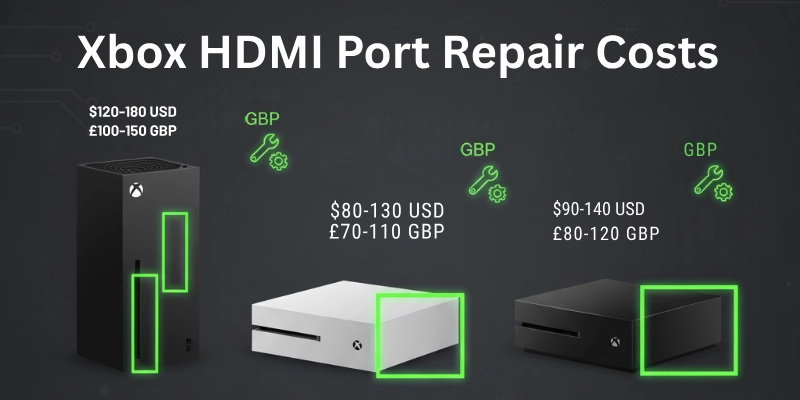
Basically, the repair cost usually depends on the model of your console and your location. Let’s break it down for you.
Xbox One HDMI Repair Cost
For Xbox One HDMI repair, most local shops or service centers charge between $50 to $90 (USD).
- In countries like the USA, UK, or Canada, this cost may be a little higher depending on labor charges.
- Some repair centers also offer HDMI replacement Xbox One packages that include both parts and labor.
Xbox Series S HDMI Port Repair Cost
The Xbox Series S HDMI port repair cost usually ranges between $60 to $100, depending on whether you choose:
- Authorized service centers, which charge more but offer warranties.
- Local repair shops, which are cheaper but may not give warranties.
If you are in a high-demand area, it’s always good to search for Xbox Series S HDMI port repair cost near me on Google or Maps to compare prices.
Xbox Series X HDMI Repair Cost
HDMI repair on Xbox Series X is generally more expensive than other models due to the complexity of its design.
- The average cost ranges from $80 to $120.
- HDMI Xbox Series X repair at an official service center might be on the higher end but ensures better quality work.
Cost Variations by Country
These are just hints:
| Country | Average Repair Cost |
| USA | $80 – $120 |
| UK | £60 – £100 |
| Canada | $85 – $130 CAD |
| Australia | AUD 100 – 150 |
| India | ₹2,000 – ₹5,000 |
Prices also vary based on city and availability of professional technicians.
DIY vs Professional Repair: Cost Comparison
Just hints:
| Repair Method | Average Cost | Includes |
| DIY Repair | $10 – $30 | Tools + HDMI Port (no labor cost) |
| Pro Repair | $60 – $120 | Parts + Skilled Labor + Warranty |
If you have soldering skills, DIY HDMI Xbox repair is cheaper. But for most people, professional repair is safer and more reliable.
Preventing Future HDMI Port Damage
Here are some easy and practical tips to prevent damage to your Xbox HDMI port in the future.
Use HDMI Cable with 90-Degree Angle
- A 90-degree HDMI cable helps reduce pressure on the HDMI port.
- It keeps the cable close to the console and prevents pulling or bending.
- This is especially helpful for tight spaces or wall-mounted TVs.
- It’s a small change, but it can extend the life of your port.
Don’t Move Console While Plugged In
- One common cause of damage is moving the Xbox while the HDMI cable is still connected.
- This can easily bend or break the HDMI port pins.
- Always unplug the cable first if you want to shift your Xbox.
Regular Cleaning
- Dust can collect around the HDMI port over time.
- Use a soft brush or air blower to clean the port gently.
- Don’t use anything sharp or metallic—it can damage the internal parts.
Use a Surge Protector
- Sometimes, electrical surges or spikes can damage both your HDMI port and motherboard.
- A surge protector keeps your console safe from sudden power shocks.
- It’s a smart investment for all your electronics, not just Xbox.
Taking these small steps can save you from the cost and hassle of HDMI Xbox repair again and again.
Conclusion
In this guide, we discussed everything about Xbox HDMI repair—from common signs and causes to fixing steps and repair costs. Whether you want to do it yourself or take help from a repair expert, now you know what to do.
Don’t forget to check the FAQ section below — it’s the most important part for answering your last-minute questions!
FAQs
Here are some of the commonly asked questions related to Xbox HDMI repairing:
Yes, you can try Xbox HDMI port repair at home if you have the right tools like a soldering kit, replacement HDMI port, and basic repair knowledge. However, if you’re not confident, it’s better to visit a professional to avoid damaging your console further.
The average Xbox HDMI repair cost depends on your console model and your location.
- For Xbox One, it usually costs between $40 to $80.
- For Xbox Series S and Series X, the cost can go up to $90 or more, especially if it’s done by a professional service.
HDMI replacement for Xbox One is not too difficult for those with soldering skills and repair experience. But for beginners, it can be tricky and time-consuming. One wrong move can damage your console’s motherboard.
Most professionals take about 1 to 2 hours for HDMI Xbox Series X repair, depending on the damage. If you try the DIY method at home, it may take longer, especially if it’s your first time doing console repairs.
You can find Xbox HDMI port repair near me by checking local electronics or gaming repair shops. Search online using phrases like:
- Xbox Series X HDMI repair near me
- Xbox One HDMI repair near me



- Be Respectful
- Stay Relevant
- Stay Positive
- True Feedback
- Encourage Discussion
- Avoid Spamming
- No Fake News
- Don't Copy-Paste
- No Personal Attacks
- Be Respectful
- Stay Relevant
- Stay Positive
- True Feedback
- Encourage Discussion
- Avoid Spamming
- No Fake News
- Don't Copy-Paste
- No Personal Attacks
